


Superchips Questions and Updates




All Star
Joined: Dec 2005
Posts: 809
Likes: 0
From: GA

Just a quick overview of how the shift schedule option functions in the program. I hope this helps some become a little more familiar with the program.
It can be overwhelming when you look see it in the tuner for the first time, but it's not as difficult as you think. Plus you'll have access to the betas for help and some shift schedules.
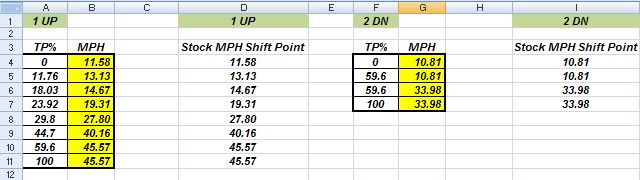
Take a look at the picture of my 1up and 2down stock shift schedule in the excel columns (please note: the TP%'s will vary over different years). The MPH numbers highlighted in yellow the user can change.
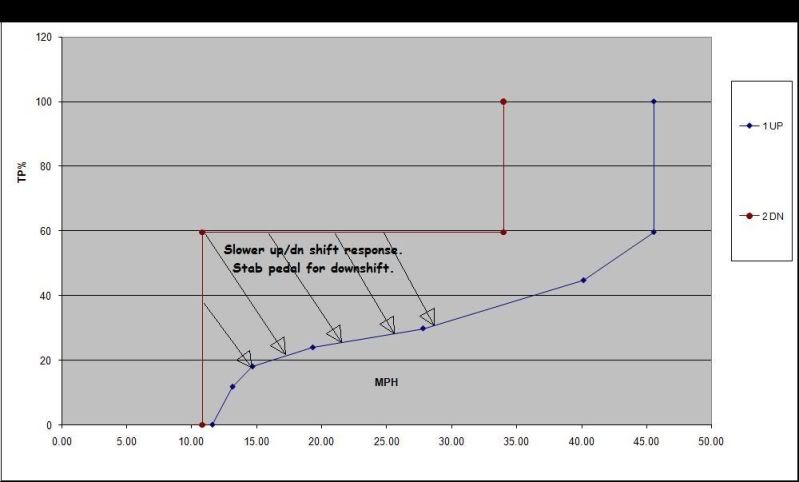
The object of the program is, using 1u/2d as an example, is to make the shifts more responsive. If you notice, in the stock graph of 1u/2d, the stock shift schedule is not very responsive.
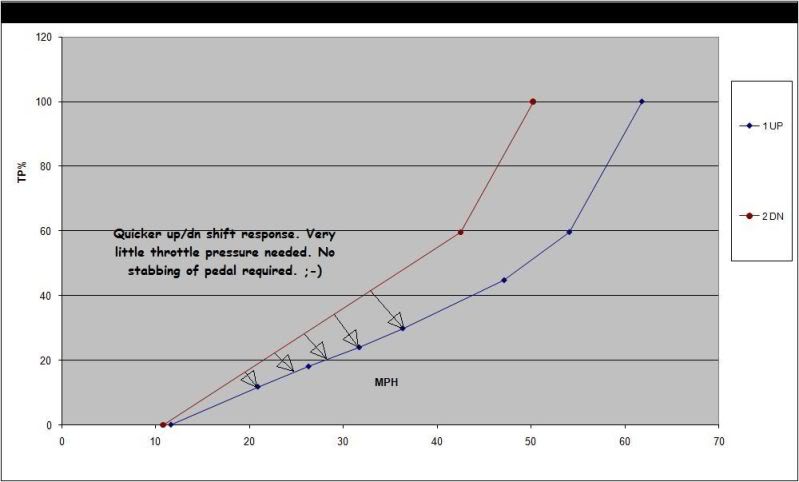
Looking at the current stock numbers, you would want to move your up shifts out further and in turn move your down shifts closer. The closer the downshift to the up shift, the more responsive the down shift.
The beauty of the program is, you can make it more responsive in areas that you want a quicker downshift and not as responsive in areas you want a smoother transition. It's totally up to the user.
Please remember that what one user thinks is a great schedule, another user will want to change areas in that same schedule. There is no one size fits all shift schedule.
1U/2D Stock MPH (excel)
1U/2D Stock Graph (excel)
1U/2D User Graph (excel)
HTH,
Sil
It can be overwhelming when you look see it in the tuner for the first time, but it's not as difficult as you think. Plus you'll have access to the betas for help and some shift schedules.
Take a look at the picture of my 1up and 2down stock shift schedule in the excel columns (please note: the TP%'s will vary over different years). The MPH numbers highlighted in yellow the user can change.
The object of the program is, using 1u/2d as an example, is to make the shifts more responsive. If you notice, in the stock graph of 1u/2d, the stock shift schedule is not very responsive.
Looking at the current stock numbers, you would want to move your up shifts out further and in turn move your down shifts closer. The closer the downshift to the up shift, the more responsive the down shift.
The beauty of the program is, you can make it more responsive in areas that you want a quicker downshift and not as responsive in areas you want a smoother transition. It's totally up to the user.
Please remember that what one user thinks is a great schedule, another user will want to change areas in that same schedule. There is no one size fits all shift schedule.
1U/2D Stock MPH (excel)
1U/2D Stock Graph (excel)
1U/2D User Graph (excel)
HTH,
Sil

All Star
Joined: Dec 2005
Posts: 809
Likes: 0
From: GA

Grand Champion
Joined: Dec 2008
Posts: 6,556
Likes: 1
From: TX


Veteran
Joined: Jul 2007
Posts: 369
Likes: 0
From: north jersey
so im going to pick up my 3865 now. its about a half hour drive and mostly highway. im gonna reset my overhead before i leave and see what my average mpg is on the way there. once im at the shop ill plug it in, have it learn my stock tune, and then use the 91 quick tune (i have 93 in there now) and use the tire calibration (i have 35's) and reset the overhead again when i leave the shop and see if theres a difference right away. im not expecting a bige difference, but if there is awesome!