


TV cable check (Not the one on your 65" flat panel)


Thread Starter
|
Professional
Joined: Apr 2011
Posts: 218
Likes: 0
From: Summerset, SD
 TV cable check (Not the one on your 65" flat panel)
Just thought I’d throw this out there and share a bit.
Lately I’ve been noticing a little decrease in performance and a slight drop in fuel economy. Engine throttle response is good, but felt like a slight slipping in the trans especially while cruising on the highway 65-75mph, <20% throttle. Almost like having a steady headwind. I keep my D well maintained and serviced trans w/band adjustments less than a year ago. So I decided to check the TV (throttle valve) cable and noticed about 2-3mm of slack. I adjusted the slack out completely so that the TV cable moves with the TB perfectly, not advanced in any way just no slack. Well this made all the difference in the world and probably added a few more years to my transmission; feels like a new transmission and MPGs are back up.
This is a very easy adjustment; I have a 2001 5.9 4x4 (46rfe)btw. Simply, gently pop the white locking clip with the “T” on it from the TB bracket and move the cable so that when the TB starts to open there is no delay in movement from the TV cable. You don’t want to make it too tight, just enough to barely take up the slack. You don’t even need any tools for this. Just don’t break the locking clip, it’s pretty delicate and is the only thing holding the cable in adjustment.
Lately I’ve been noticing a little decrease in performance and a slight drop in fuel economy. Engine throttle response is good, but felt like a slight slipping in the trans especially while cruising on the highway 65-75mph, <20% throttle. Almost like having a steady headwind. I keep my D well maintained and serviced trans w/band adjustments less than a year ago. So I decided to check the TV (throttle valve) cable and noticed about 2-3mm of slack. I adjusted the slack out completely so that the TV cable moves with the TB perfectly, not advanced in any way just no slack. Well this made all the difference in the world and probably added a few more years to my transmission; feels like a new transmission and MPGs are back up.
This is a very easy adjustment; I have a 2001 5.9 4x4 (46rfe)btw. Simply, gently pop the white locking clip with the “T” on it from the TB bracket and move the cable so that when the TB starts to open there is no delay in movement from the TV cable. You don’t want to make it too tight, just enough to barely take up the slack. You don’t even need any tools for this. Just don’t break the locking clip, it’s pretty delicate and is the only thing holding the cable in adjustment.

Thread Starter
|
Professional
Joined: Apr 2011
Posts: 218
Likes: 0
From: Summerset, SD
I'll take one tomorrow. I converted the garage into a play area for the kids for the weekend and we have 65+ mph winds with sleet right now. So as long as I still have a roof on my house, I'll try to get one posted in the morning. Until then, it's the cable on the aft passenger side of the TB that leads down to the trans.

THE ULTI-MOD


Joined: Jan 2007
Posts: 19,797
Likes: 36
From: Union NJ
i think its probably a typo, but for the sake of people who dont know as much about these trucks you have the 46 RE, the RFE indicated full electronic control, usually a TCM unit will be found on trucks with one of these transmissions.


Veteran
Joined: Sep 2010
Posts: 314
Likes: 0
From: Western Mass
Well this takes care of a question I've been planing to ask for a while. I've notinced I have about a quarter inch of slack and just never got around to asking how to fix it. Just assumed I needed a new cable. Thanks for the help

Here are pics and explanation.
This is where slack should show.
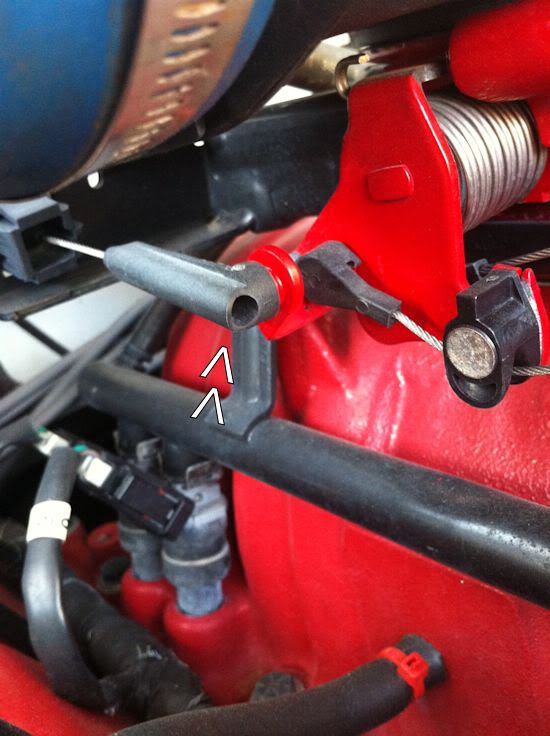
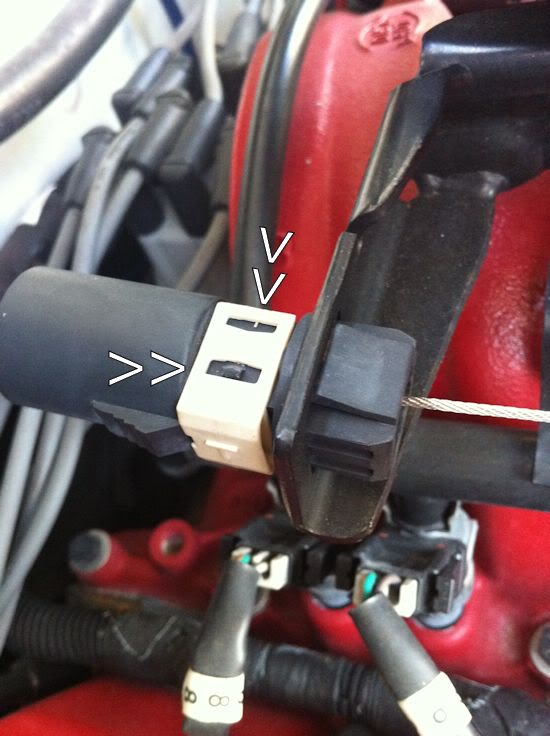
This is the T-clip. Arrows on left show tab clip needs to clear. Back arrows show where you lift clip to remove. You do it from the bottom and top of clip and be careful as not to break the clip.
T-Clip removed
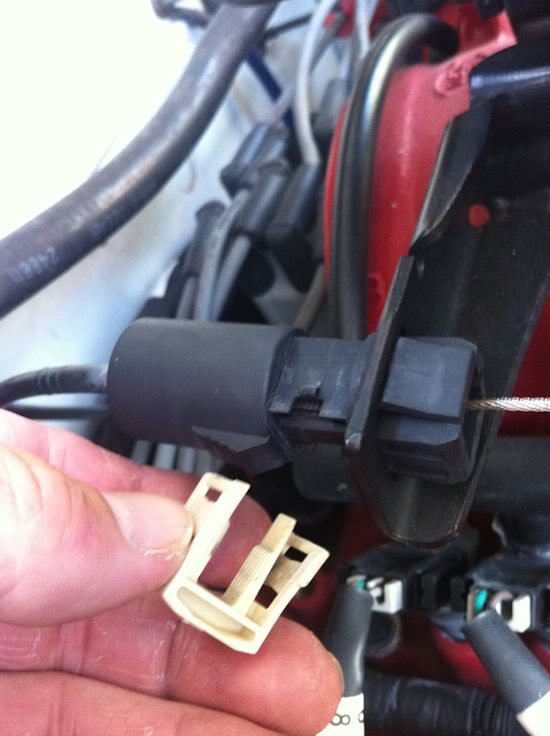
Above is just showing the T-clip removed. You do not have to remove the T-clip though. Just move it back as in this pic. That way once you take up slack, and as you are holding the slack, simply push the T-clip back in place.
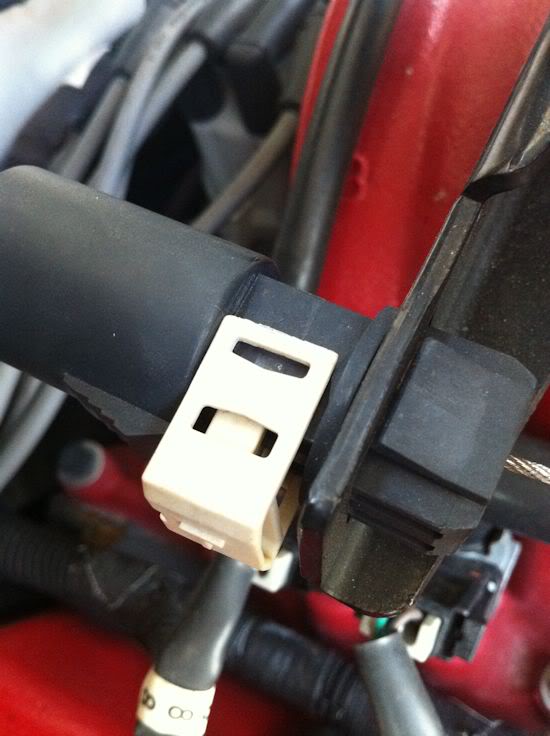
This shows this position of the cable before adjustment. Then the pic below this one shows how much slack I removed. You can see from the white on the cable from it being inside the sleeve all these years.
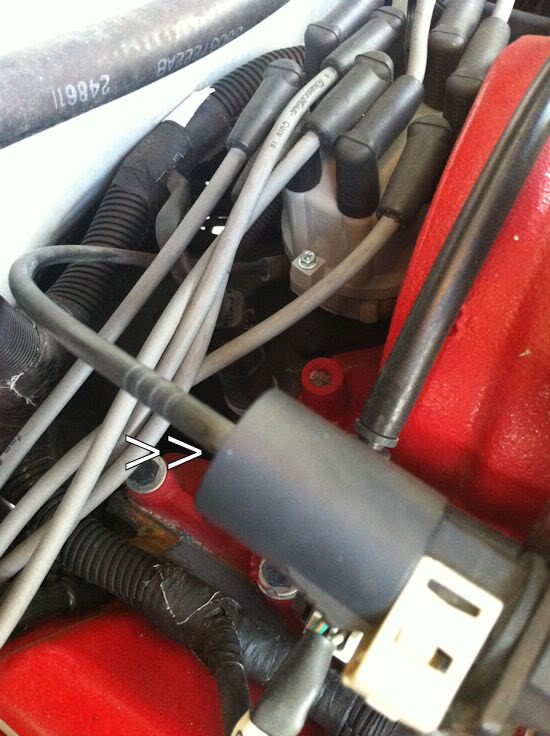
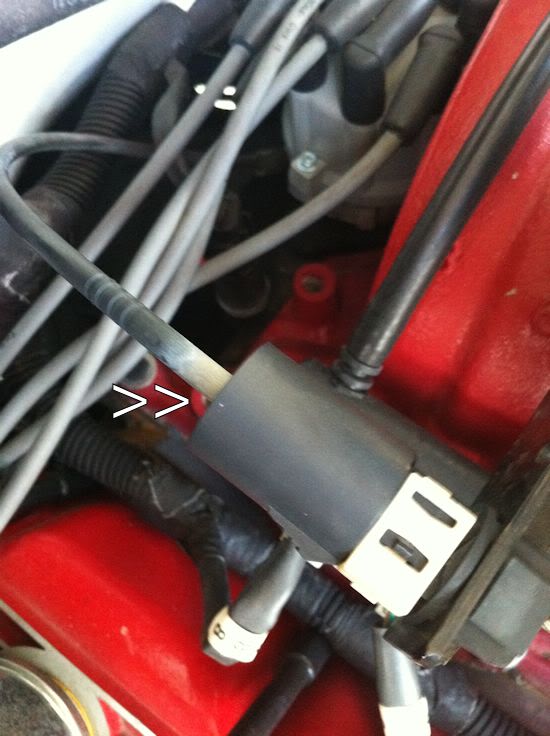
Pretty basic to do. Just do not over adjust. Once T-clip is pulled out as in pic 4, then move cable back and forth, where it comes out the sleeve in pics 5 and 6, while holding cable at the throttle body connection in pic 1. You will feel the connection at the throttle body get tight and loose as you do this.
Then pull back on cable in pic 4 until you feel it get tight at the throttle body and then simply push T-clip back in place.
Hope this helps.
This is where slack should show.
This is the T-clip. Arrows on left show tab clip needs to clear. Back arrows show where you lift clip to remove. You do it from the bottom and top of clip and be careful as not to break the clip.
T-Clip removed
Above is just showing the T-clip removed. You do not have to remove the T-clip though. Just move it back as in this pic. That way once you take up slack, and as you are holding the slack, simply push the T-clip back in place.
This shows this position of the cable before adjustment. Then the pic below this one shows how much slack I removed. You can see from the white on the cable from it being inside the sleeve all these years.
Pretty basic to do. Just do not over adjust. Once T-clip is pulled out as in pic 4, then move cable back and forth, where it comes out the sleeve in pics 5 and 6, while holding cable at the throttle body connection in pic 1. You will feel the connection at the throttle body get tight and loose as you do this.
Then pull back on cable in pic 4 until you feel it get tight at the throttle body and then simply push T-clip back in place.
Hope this helps.
Trending Topics
I need to mention that you will feel a difference in shifting after you do this. It will hit harder going into 2nd gear. If the shifting just does not feel right, then you might have adjusted the cable to tight.
Over adjustment will cause it to stay in second gear and go into third at around 30MPH to 35MPH. So as I said, if the shifting does not feel right to you, then you need to let out the cable some.
Over adjustment will cause it to stay in second gear and go into third at around 30MPH to 35MPH. So as I said, if the shifting does not feel right to you, then you need to let out the cable some.