
3rd Gen Dakota 2005 - 2011 Dodge Dakota Tech - The ultimate forum for technical help on the 3rd Gen Dakota.

double din radio

Old Mar 19, 2012 | 10:52 AM
  #1  
scully17's Avatar
scully17
Thread Starter
|
Registered User
Joined: Apr 2011
Posts: 9
Likes: 0
From: Williamsport PA
Default double din radio

i would really like to upgrade my radio to a nice double din pioneer but from what i understand my 05 kota was never intended to have a double din... i was wondering if anyone out there has ever done it and how hard is it. any input would be helpfull
 
Reply
Old Mar 19, 2012 | 04:15 PM
  #2  
Reject's Avatar
Reject
Record Breaker
Joined: Dec 2010
Posts: 1,191
Likes: 1
From: Nova Scotia, CANADA
Default

Originally Posted by scully17
i would really like to upgrade my radio to a nice double din pioneer but from what i understand my 05 kota was never intended to have a double din... i was wondering if anyone out there has ever done it and how hard is it. any input would be helpfull

There is a few threads on this already, Did you use the search? lol

Its fairly simple, mostly just trimming the Bezel, and I think so inside dash plastic to (that the normal radio sits on)
It has been done by a few people. Also Get the CANbus adapter or youll have to tap into the Cig Lighter for power, or run a line for it.
 
Reply
Old Mar 19, 2012 | 04:21 PM
  #3  
MitsuRaider's Avatar
MitsuRaider
All Star
Joined: Mar 2011
Posts: 838
Likes: 1
From: Miami, Florida
Default

Here is my own install:

https://dodgeforum.com/forum/3rd-gen...t-install.html
 
Reply
Old Mar 19, 2012 | 08:06 PM
  #4  
ballsout's Avatar
ballsout
Professional
Joined: May 2010
Posts: 122
Likes: 0
Default

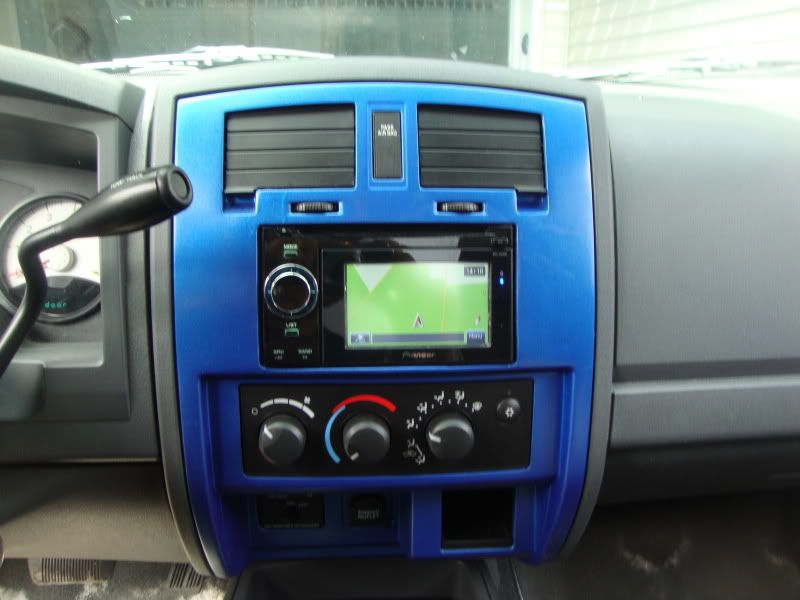
easy enough to do....
DSC01335.jpg

if you like i can give you step by step instructions. Just takes time and patience.
 
Reply
Old Mar 19, 2012 | 09:11 PM
  #5  
Reject's Avatar
Reject
Record Breaker
Joined: Dec 2010
Posts: 1,191
Likes: 1
From: Nova Scotia, CANADA
Default

Originally Posted by ballsout
easy enough to do....


if you like i can give you step by step instructions. Just takes time and patience.
Love the blue....Can I have your 12v lol I still havnt found the black ring to hold mine in since it broke, neither can dodge...
 
Reply
Old Mar 19, 2012 | 09:13 PM
  #6  
MitsuRaider's Avatar
MitsuRaider
All Star
Joined: Mar 2011
Posts: 838
Likes: 1
From: Miami, Florida
Default

x2, i like the blue. is that the MyGig I hear about?
 
Reply
Old Mar 19, 2012 | 10:25 PM
  #7  
norma jean's Avatar
norma jean
Captain
Joined: Jan 2012
Posts: 714
Likes: 0
From: Syracuse, New York
Default

Originally Posted by Reject
Love the blue....Can I have your 12v lol I still havnt found the black ring to hold mine in since it broke, neither can dodge...
i was looking around the markplace today and i believe weedahoe has a bunch of the 12 v, sockets and rings, i don't know if they're all the same size and such

https://dodgeforum.com/forum/parts-s...d-sockets.html
 
Reply
Old Mar 21, 2012 | 03:17 PM
  #8  
dingdong2's Avatar
dingdong2
Professional
Joined: Mar 2010
Posts: 166
Likes: 0
Default

Originally Posted by ballsout
easy enough to do....

if you like i can give you step by step instructions. Just takes time and patience.

Yes Please! :-D I think my biggest concern/question is how is it mounted behind the dashboard cover (the blue thing)? Were you able to mount it with the factory screw holes? I would like to get a nice touch screen and I don't like those flip-up models so I want a full double din touch screen.
 
Reply
Old Mar 21, 2012 | 04:07 PM
  #9  
jkeaton's Avatar
jkeaton
DF Admin
15 Year Member
Photogenic
Photoriffic
Liked
Joined: Apr 2010
Posts: 28,194
Likes: 362
From: Winston Salem, NC
Default

Originally Posted by dingdong2
Yes Please! :-D I think my biggest concern/question is how is it mounted behind the dashboard cover (the blue thing)? Were you able to mount it with the factory screw holes? I would like to get a nice touch screen and I don't like those flip-up models so I want a full double din touch screen.
Ditto
 
Reply
Old Mar 21, 2012 | 04:23 PM
  #10  
dingdong2's Avatar
dingdong2
Professional
Joined: Mar 2010
Posts: 166
Likes: 0
Default

Originally Posted by dingdong2
Yes Please! :-D I think my biggest concern/question is how is it mounted behind the dashboard cover (the blue thing)? Were you able to mount it with the factory screw holes? I would like to get a nice touch screen and I don't like those flip-up models so I want a full double din touch screen.
Another question that I forgot to include in my last post is... how do you make the cut edge look nice?
 
Reply

Thread Tools
Search this Thread

All times are GMT -4. The time now is 07:55 PM.