


OBD Scanner for specific sensor reading


Thread Starter
|
Registered User
Joined: Nov 2025
Posts: 2
Likes: 0
 OBD Scanner for specific sensor reading
Looking to hear if anyone has direct knowledge of a specific code scanner which can read the transmission temperature.
Vehicle: 2008 Dakota, 4x4, 4.7L, 545RFE
Information on some readers say they can read the TCM codes, but that is different than real-time (live) reading of the transmission temperature.
I have an older Actron, no option.
I have a Superchips FlashPaq, no option.
Borrowed a friend's Bluedriver, no option.
So, any currently available & affordable Make & Model of scanner that y'all have first hand knowledge of?
Can this Dakota even source the trans temp out over OBD?
Vehicle: 2008 Dakota, 4x4, 4.7L, 545RFE
Information on some readers say they can read the TCM codes, but that is different than real-time (live) reading of the transmission temperature.
I have an older Actron, no option.
I have a Superchips FlashPaq, no option.
Borrowed a friend's Bluedriver, no option.
So, any currently available & affordable Make & Model of scanner that y'all have first hand knowledge of?
Can this Dakota even source the trans temp out over OBD?


Thread Starter
|
Registered User
Joined: Nov 2025
Posts: 2
Likes: 0
Thanks philipat
I was looking at the MX+ hardware, seems to be supportive.
https://www.obdlink.com/download/pdf-mx-oem/
I emailed OC Tech to inquire about their android Fusion OBD app.
https://www.obdsoftware.net/software/obdfusion
Looks like it will do the trick, with the FCA enhanced addon installed.
https://www.obdsoftware.net/software/fcaenhancedaddon
That $90 addon noted abouve seems to be for the windows desktop Fusion.
I think i saw somewhere that individual vehicle year-specific addons for the Android Fusion are about $15 each...
The email, for the benefit of others:
Good afternoon,
A couple questions as I contemplate a purchase.
Specifically for use on a 2008 Dodge Dakota 4.7L
I want to read/monitor the Transmission Temperature sensor (545RFE transmission)
If using the OBDLINK MX+ & the OBD Fusion for Android Phone/Tablet:
Will this display Transmission Temperature sensor without the FCA Enhanced addon?
If not, will the FCA Enhanced addon give that feature? on Android Phone/Tablet?
THE REPLY:
Hello,
Transmission temperature is not available over standard OBD2 and would require the enhanced add-on.
Regards,
Matt
I was looking at the MX+ hardware, seems to be supportive.
https://www.obdlink.com/download/pdf-mx-oem/
I emailed OC Tech to inquire about their android Fusion OBD app.
https://www.obdsoftware.net/software/obdfusion
Looks like it will do the trick, with the FCA enhanced addon installed.
https://www.obdsoftware.net/software/fcaenhancedaddon
That $90 addon noted abouve seems to be for the windows desktop Fusion.
I think i saw somewhere that individual vehicle year-specific addons for the Android Fusion are about $15 each...
The email, for the benefit of others:
Good afternoon,
A couple questions as I contemplate a purchase.
Specifically for use on a 2008 Dodge Dakota 4.7L
I want to read/monitor the Transmission Temperature sensor (545RFE transmission)
If using the OBDLINK MX+ & the OBD Fusion for Android Phone/Tablet:
Will this display Transmission Temperature sensor without the FCA Enhanced addon?
If not, will the FCA Enhanced addon give that feature? on Android Phone/Tablet?
THE REPLY:
Hello,
Transmission temperature is not available over standard OBD2 and would require the enhanced add-on.
Regards,
Matt

Veteran

Joined: Jun 2011
Posts: 387
Likes: 18
Looking to hear if anyone has direct knowledge of a specific code scanner which can read the transmission temperature.
Vehicle: 2008 Dakota, 4x4, 4.7L, 545RFE
Information on some readers say they can read the TCM codes, but that is different than real-time (live) reading of the transmission temperature.
I have an older Actron, no option.
I have a Superchips FlashPaq, no option.
Borrowed a friend's Bluedriver, no option.
So, any currently available & affordable Make & Model of scanner that y'all have first hand knowledge of?
Can this Dakota even source the trans temp out over OBD?
Vehicle: 2008 Dakota, 4x4, 4.7L, 545RFE
Information on some readers say they can read the TCM codes, but that is different than real-time (live) reading of the transmission temperature.
I have an older Actron, no option.
I have a Superchips FlashPaq, no option.
Borrowed a friend's Bluedriver, no option.
So, any currently available & affordable Make & Model of scanner that y'all have first hand knowledge of?
Can this Dakota even source the trans temp out over OBD?
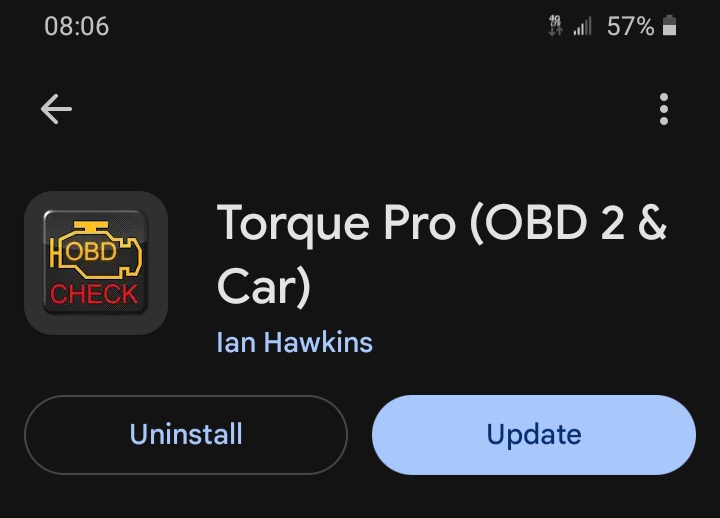
To start, here's the Android app (don't know if it's available on Apple):
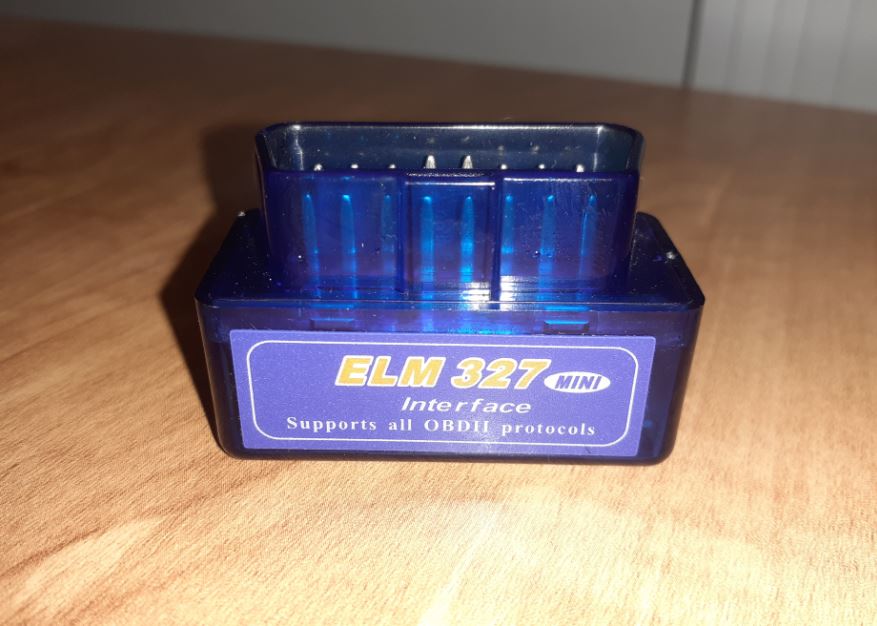
And this is the Bluetooth OBD reader. I got it though Amazon several years ago for cheap, probably a few derivatives of it out there. It will come with instructions on how to link the Bluetooth to your device, and mine will only power on when the key is in the "Run" position:
The Torque app will also need to be setup to use the OBD adapter, and those settings are found in the Settings section of the app, then the "OBD2 Adapter Settings" section.
At this point, before going through with creating the parameter ID in the app for the transmission temp, I would make sure that the app and bluetooth reader are working/connected correctly and show basic operating information about the truck in the "Realtime Information" section of the app while the truck is running. There will be some default status-displays shown in that section like coolant temp, throttle position %, speed, etc, and you can swipe left and right through several pages of the default displays. You can also add your own display of data that wasn't shown by default by long-pressing in a blank area, tap "Add Display", select a type of display (Dial, Graph, Digital, etc), then select a "Sensor" type for that display and a display size. The sensor-type list is pretty long, and not all sensor types will work with our trucks. Those "sensors" which are actively receiving data will have a green background, while those without data will have a black background.
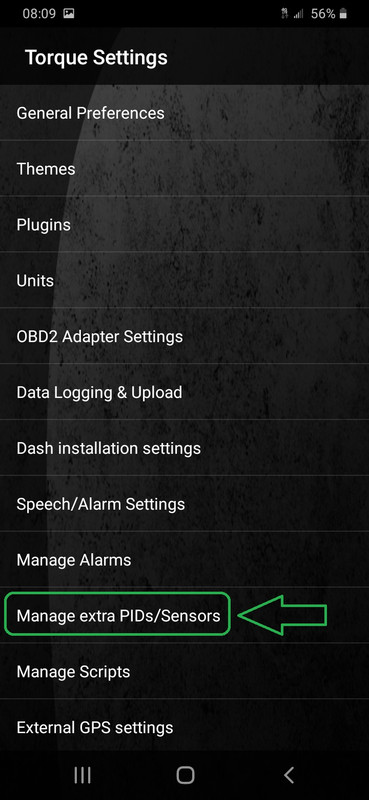
Once you've confirmed that the app is actively receiving and displaying realtime data from the truck, now it's time to create a custom parameter ID for the transmission temp (which creates its own line-item "sensor" in the sensor list). Go back to the Settings section of the app, and tap "Manage extra PIDs/Sensors":
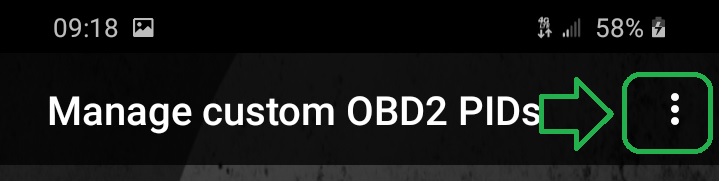
Then in the top-right corner, tap the 3 dots:
And tap "Add custom PID":

In the next screen (the "OBD2 PID Editor" screen), enter the following information exactly as shown on the below 3 slides (other than the name...feel free to name the PID whatever you want
 ), and then tap "OK" at the end: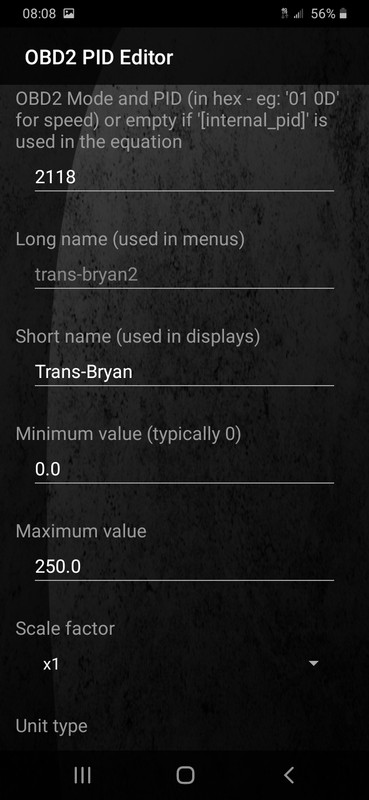
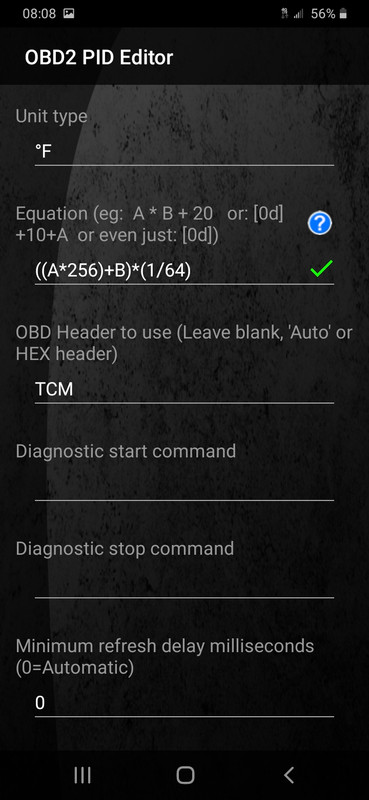
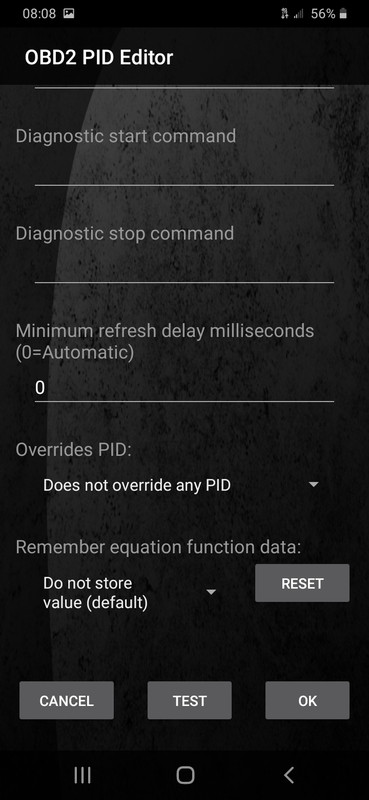
So this just created a new "sensor" on the sensor list. Go back to the Realtime Information screen, long-press in a blank area, tap "Add display", select a display type (Dial, Graph, Digital, etc), find and select the "sensor" you just created above by the name entered in the "Long name" field, and select a display size.
When the truck is running, everything is connected, and the app is actively receiving and displaying realtime data, you should see your transmission temp in that display like mine shown below. :-)
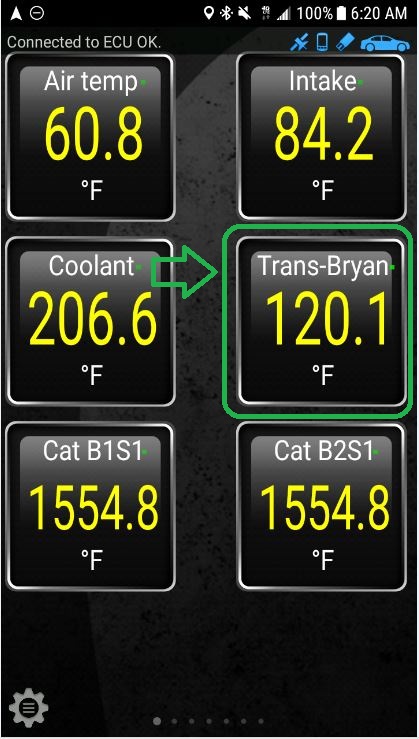
You can also move/resize/change the display types shown by long-pressing on a display and choosing among the display options. Hope this works!
