



first major attempt....



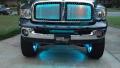



That looks really good man.
IMO, I'd either go with a skeleton look or the "dragon" look. The two just don't fit.
If you go in under your truck's layer, and then click the image tab at the top- then go to adjustments- then vribrance I think it is, you can make the truck pop a little more than it is. Maybe it's just the smoke in front of it. I dunno.
(I was talking about CS4 with the steps...)
IMO, I'd either go with a skeleton look or the "dragon" look. The two just don't fit.
If you go in under your truck's layer, and then click the image tab at the top- then go to adjustments- then vribrance I think it is, you can make the truck pop a little more than it is. Maybe it's just the smoke in front of it. I dunno.
(I was talking about CS4 with the steps...)

Thread Starter
|
Grand Champion
Joined: Apr 2007
Posts: 5,930
Likes: 1
From: TAMPA BAY
right now im working with pse8 its atrial version but i have a line on another program im gonna get i was just screwing around learning i have since taken that pic apart and am working on something new if you have tipsfeel free to pm me with them thanks laramie.....

Record Breaker
Joined: Jul 2007
Posts: 1,562
Likes: 1
From:
if you have adobe cs4 like me, make masks on all your layers that way they blend together, as in u can have the fire blend into the truck etc. use different opacities. i took a photoshop class last semester. i still don't get how people lift trucks, add wheels, etc and make it look totally real!