

Dodge Forum Site Issues and Suggestions Having an issue with the DF software? This is your section!

rename a link

Thread Tools
 
Search this Thread
 
Old Oct 21, 2009 | 05:12 PM
  #1  
OklaHemi's Avatar
OklaHemi
Thread Starter
|
Champion
Joined: Jun 2009
Posts: 3,210
Likes: 0
From: Collinsville, Oklahoma
Default rename a link

how do i do it? i can't figure it out. thanks---mike
 
Reply
Old Oct 21, 2009 | 08:07 PM
  #2  
Laramie1997's Avatar
Laramie1997
Grand Champion
Joined: Sep 2008
Posts: 6,980
Likes: 5
From: Springfield MO
Default

Like this?

Watch:

Copy the link you want to change.

In this case, I chose this: www.google.com

Type what you want to change

Then Click and drag your mouse back over the text you want to change.
Then click this button:

Name:  Linkbutton.gif
Views: 18
Size:  84.7 KB


Once you click the link, a new box will appear asking you insert the link you want:
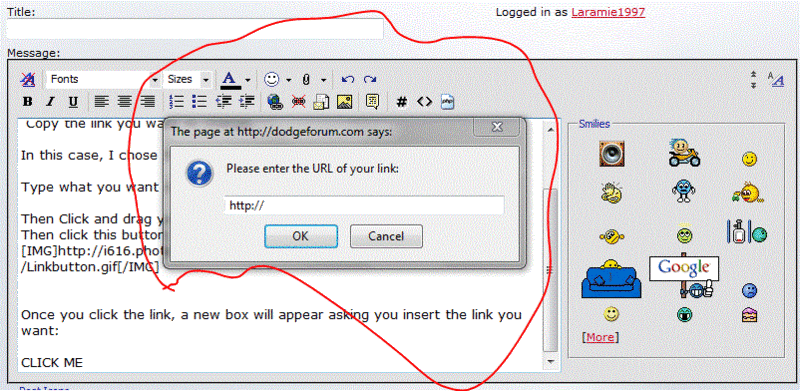
Name:  LinkInsert.gif
Views: 21
Size:  227.3 KB


When you are done, the finished product should look like this:

Name:  CLICKME.gif
Views: 20
Size:  2.0 KB


CLICK ME!
 
Reply
Old Oct 21, 2009 | 09:47 PM
  #3  
BadHab1t's Avatar
BadHab1t
Grand Champion
Joined: Apr 2007
Posts: 5,930
Likes: 1
From: TAMPA BAY
Default

there ya go mike its done now go fix it.....
 
Reply
Old Oct 21, 2009 | 09:53 PM
  #4  
OklaHemi's Avatar
OklaHemi
Thread Starter
|
Champion
Joined: Jun 2009
Posts: 3,210
Likes: 0
From: Collinsville, Oklahoma
Default

is has been done, thanks laramie
 
Reply
Old Oct 21, 2009 | 09:59 PM
  #5  
Laramie1997's Avatar
Laramie1997
Grand Champion
Joined: Sep 2008
Posts: 6,980
Likes: 5
From: Springfield MO
Default

Denada.

I'm kicking this out of OT and over to Forum help.
 
Reply
Old Oct 22, 2009 | 12:50 AM
  #6  
OklaHemi's Avatar
OklaHemi
Thread Starter
|
Champion
Joined: Jun 2009
Posts: 3,210
Likes: 0
From: Collinsville, Oklahoma
Default

cool i wasn't sure where to post it. i know where all the big dogs hang out. i knew it would get answered
 
Reply


All times are GMT -4. The time now is 10:46 PM.