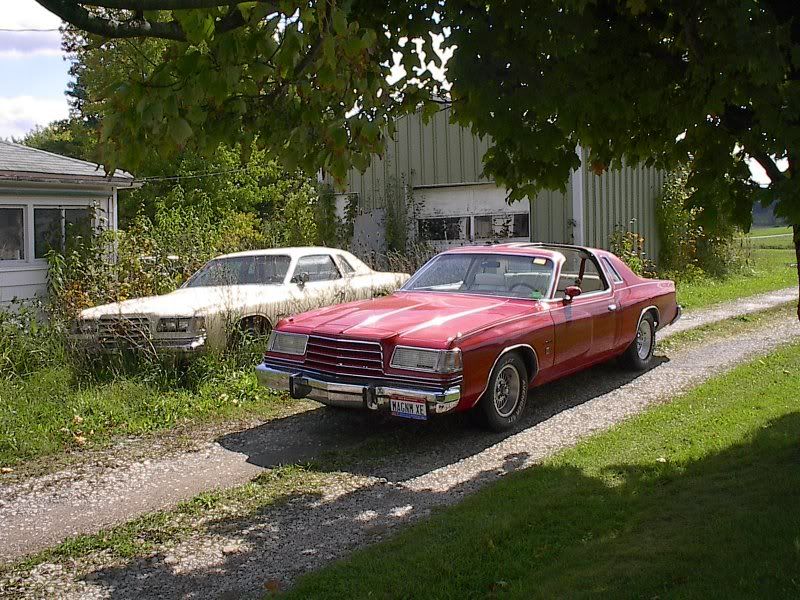
Post Pictures of Custom Magnums:


Veteran
Joined: Sep 2005
Posts: 342
Likes: 0
From: Fairfield, Ca.
 RE: Post Pictures of Custom Magnums:
My recently updated version.
[IMG]local://upfiles/20755/C1804254A4CD4B2DA7CFDC0EB9150545.jpg[/IMG]
[IMG]local://upfiles/20755/6C90B86454AD4403BC8E21B53B06E399.jpg[/IMG]
[IMG]local://upfiles/20755/6FDD5693AD794EF6A44699999417CC8A.jpg[/IMG]
[IMG]local://upfiles/20755/C1804254A4CD4B2DA7CFDC0EB9150545.jpg[/IMG]
[IMG]local://upfiles/20755/6C90B86454AD4403BC8E21B53B06E399.jpg[/IMG]
[IMG]local://upfiles/20755/6FDD5693AD794EF6A44699999417CC8A.jpg[/IMG]


Veteran
Joined: Sep 2005
Posts: 342
Likes: 0
From: Fairfield, Ca.
RE: Post Pictures of Custom Magnums:
Hey pjoseph,
I gonna try one and this time I am going to try and pay attention to what I am doing. ...standby.
[IMG]local://upfiles/20755/B969E493B49140E49F1544A5B8A836C5.jpg[/IMG]
Okay, here's what I did. I uploaded the picture from my harddrive.
If you do it from your harddrive the picture must not exceed 500k in size. Check mark the box at the bottom of the message edit box that says embed photo and then click on upload photo (right next to the embed check mark). Open the browse box and find your photo on your computer and then follow the prompts.
I'm not too sure how to post them directly from your photobucket account.
I know that you can create a link to your photobucket gallery by coping the http address from your browser's navigation command line and then click on the "insert link" icon above your message edit box (the little globe, that's the 3rd icon from the right). Paste your photobucket address and then click "OK".
Good Luck
I gonna try one and this time I am going to try and pay attention to what I am doing. ...standby.
[IMG]local://upfiles/20755/B969E493B49140E49F1544A5B8A836C5.jpg[/IMG]
Okay, here's what I did. I uploaded the picture from my harddrive.
If you do it from your harddrive the picture must not exceed 500k in size. Check mark the box at the bottom of the message edit box that says embed photo and then click on upload photo (right next to the embed check mark). Open the browse box and find your photo on your computer and then follow the prompts.
I'm not too sure how to post them directly from your photobucket account.
I know that you can create a link to your photobucket gallery by coping the http address from your browser's navigation command line and then click on the "insert link" icon above your message edit box (the little globe, that's the 3rd icon from the right). Paste your photobucket address and then click "OK".
Good Luck
Veteran
Joined: Sep 2005
Posts: 342
Likes: 0
From: Fairfield, Ca.
RE: Post Pictures of Custom Magnums:
Let me see if I can do this for you...
http://i60.photobucket.com/albums/h7...m/670016a2.jpg
http://i60.photobucket.com/albums/h7...Magnum/Mag.jpg
http://i60.photobucket.com/albums/h7...Magnum/002.jpg
Very nice Magnum. I like the engine cover.
http://i60.photobucket.com/albums/h7...m/670016a2.jpg
http://i60.photobucket.com/albums/h7...Magnum/Mag.jpg
http://i60.photobucket.com/albums/h7...Magnum/002.jpg
Very nice Magnum. I like the engine cover.