


Fan does not work although jumps fine


Thread Starter
|
Registered User
Joined: Feb 2012
Posts: 6
Likes: 0
 Fan does not work although jumps fine
Hi Folks!
If I am the wrong please tell me, this is a large forum.
2001 Dodge Ram 1500, 5.2L. Sudden loss of ALL fan speeds. I checked fuse- good, I replaced resistor (it was cracked), jump tested fan works fine no funny grinding sounds or sluggishness, I replaced entire AC/Heater control center, still nothing---Not I have power to heated mirrors and power to air blender as well as vent selection.... I also put a new ignition switch a few months ago. There is power all the way to the blue wire leading to the fan motor where it plugs in, but no apparent ground. What's up? Is there a relay? can all the other heater controls work but yet have a grounding issue with motor alone? There is power on the main plug of 12 volts in Ac/heater control between 3 larger wires Green,blue and ground black= ground? I need a wiring diagram or a cheat to get this fan to work.
Country: United States
Make: Dodge
Model: RAM 1500 4x2
Year: 2001
If I am the wrong please tell me, this is a large forum.
2001 Dodge Ram 1500, 5.2L. Sudden loss of ALL fan speeds. I checked fuse- good, I replaced resistor (it was cracked), jump tested fan works fine no funny grinding sounds or sluggishness, I replaced entire AC/Heater control center, still nothing---Not I have power to heated mirrors and power to air blender as well as vent selection.... I also put a new ignition switch a few months ago. There is power all the way to the blue wire leading to the fan motor where it plugs in, but no apparent ground. What's up? Is there a relay? can all the other heater controls work but yet have a grounding issue with motor alone? There is power on the main plug of 12 volts in Ac/heater control between 3 larger wires Green,blue and ground black= ground? I need a wiring diagram or a cheat to get this fan to work.
Country: United States
Make: Dodge
Model: RAM 1500 4x2
Year: 2001

Administrator


Joined: Apr 2010
Posts: 87,475
Likes: 4,223
From: Clayton MI
Welcome to DF. 
01 service manual available for download in the faq section here.
Fan switch provides ground for the blower. Find the right wiring diagram, see which ground it uses, find where that ground actually is, make sure it is clean, and tight.
01 service manual available for download in the faq section here.
Fan switch provides ground for the blower. Find the right wiring diagram, see which ground it uses, find where that ground actually is, make sure it is clean, and tight.
Thread Starter
|
Registered User
Joined: Feb 2012
Posts: 6
Likes: 0
Fam inop
Thanks, I found the manual...never thought I could down it. Anyway. I also found that there is a relay for that fan ( I don't know how I missed that) Not it anyway. I will have to go through the whole circuit ant test. I believe your right about there being a ground fault somewhere. Fortunately. The resister was only 25 bucks and the same for the controls on Ebay. I love this truck had it since it was 2 years old and now have 180K w/no rust. I love the 5.2 magnum and have had few issues except the tranny is glitchy. Now it seems I am having electrical issues all over. I have put in about 10 relays in the last couple years (china) use be USA... Thanks I will post when find it so others may benefit. Maybe I can splice in a new ground....


Thread Starter
|
Registered User
Joined: Feb 2012
Posts: 6
Likes: 0
Bad Heater Fan Ground
Strange...Only the fan motor ground is affected. Hope I can find that ground or I will have to try re-route one if that's even possible.
Thread Starter
|
Registered User
Joined: Feb 2012
Posts: 6
Likes: 0
Bad Heater Fan Ground
 . May explain some of my other electrical gremlins. I have been going through various connectors and applying De-oxit to terminals and removing and cleaning as many grounds as I can. I even added another one from the battery to frame. Why? though it couldn't hurt.
Trending Topics
Thread Starter
|
Registered User
Joined: Feb 2012
Posts: 6
Likes: 0
Fam inop
I looked up those pin outs and grounding points. I actually use to do drafting but I could not find a Key for the symbols... I know most of them, but there are some numeric designations and letters that I can't figure out what they mean. I know for example, that C163 is connector 163 and G is for ground. What does the S and the number in a circuit mean?
Finally, I found the pin outs, but they don't show the colored wires going into it. Do I refer to the schematic for the colors? Doing that however won't show me which wire goes where in the connector.
I was wrong...there are over 2800 pages in the SRM. since the blend air works (i can hear the motor), the air flow director works and the heated mirror lights come on and work.
That leave one connector with four SMALL wires that go to the resistor, and three LARGE wires in same connector. I have tested all the individual component for continuity. One of those large blades is the ground in the picture below. I could not find this connector Manual for the AC/HEATER control module.
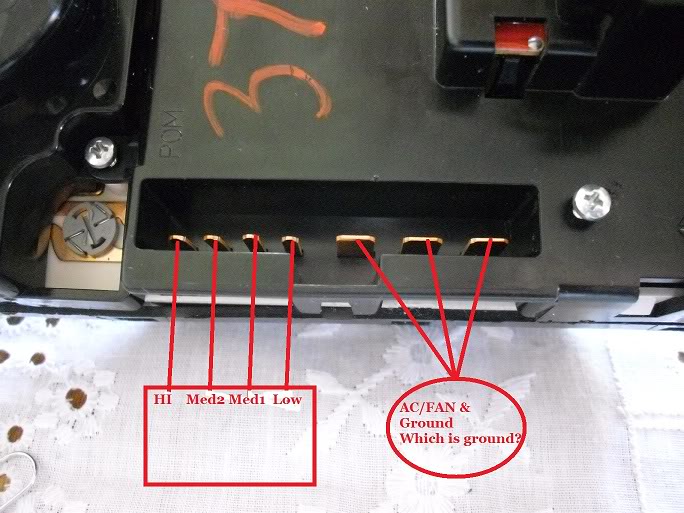
Finally, I found the pin outs, but they don't show the colored wires going into it. Do I refer to the schematic for the colors? Doing that however won't show me which wire goes where in the connector.
I was wrong...there are over 2800 pages in the SRM. since the blend air works (i can hear the motor), the air flow director works and the heated mirror lights come on and work.
That leave one connector with four SMALL wires that go to the resistor, and three LARGE wires in same connector. I have tested all the individual component for continuity. One of those large blades is the ground in the picture below. I could not find this connector Manual for the AC/HEATER control module.
Administrator
Joined: Apr 2010
Posts: 87,475
Likes: 4,223
From: Clayton MI
S### indicates Splice number ###. They are also listed in the component section for where they are.
Ground wire is black with orange trace. The illumination grounds thru that circuit as well...
Diagram for heater controls is on page 8W-42-4 in the 01 manual.
Ground wire is black with orange trace. The illumination grounds thru that circuit as well...
Diagram for heater controls is on page 8W-42-4 in the 01 manual.
Thread Starter
|
Registered User
Joined: Feb 2012
Posts: 6
Likes: 0
Fan inop
Thanks for your help. I found the problem--yeah! it was the that black wire with orange stripe, 
I re-routed a new ground and it works. I have no idea where or why it broke circuit. What a pain. You all have been a great help and saved me a ton of money.
I re-routed a new ground and it works. I have no idea where or why it broke circuit. What a pain. You all have been a great help and saved me a ton of money.