



Fuzzy backup Cam fix


Thread Starter
|
Professional
Joined: Aug 2011
Posts: 132
Likes: 0
 Fuzzy backup Cam fix
I asked this question in the lockpick install thread with no responses (yet another member had asked the same question prior). Here's is what i figured out after removing the radio and inspecting the connections with the ign on and rearview cam on as well. For anyone with a fuzzy picture, or not a "clear" image on their backup cam, you need to check this out.
Remove the radio and inspect the black wire that goes into the white plug (into the radio, or Lockpick harness adapter). Mine is taped up about 2-3 inches from where the bare wire (which is silver in color and slightly exposed) disappears into the connector. there were only 3 (iirc) wires in the white plug/connector and the one that is either powering or providing the video feed from the camera is the black one that should have some black electrical tape on it. why does it have black electrical tape on it? my guess is mine was either stripped too far when it was made (remember this is from the VEHICLE side of the wiring, coming from the dash) or maybe they're all like that. I just figured it may be that wire and a quick push of that wire and "VOILA" clear as it was from day one. I pulled the wire a bit, was sliding very easily in and out of the connector, not coming apart, just loose, and the picture became distorted again. I used new electrical tape after reattaching the connectors together and ran the tape in sort of a "bandage type" wrapping, affixed the 3 wires to the side of the connector and over the back, where the black wire goes into the connector to keep it firmly in place.
I could've removed the pin, but football is starting soon and I didn't want to get stuck if all hell broke loose!! lol
this fix is for anyone with a fuzzy view (from what i can tell by mine) wire/pin attachment is feeble at best and even without the lockpick, it was only a matter of time before my factory connection loosened up and it started to go fuzzy.
NO pics, sorry, was in a hurry up mode. just follow the lockpick install thread for access to the back of the radio and good luck!!
https://dodgeforum.com/forum/3rd-gen...4-install.html
MODS, not sure if you wanted to throw this thread somewhere (Sticky?) where others that may have this problem down the road can see if it works for them but feel free!!
Remove the radio and inspect the black wire that goes into the white plug (into the radio, or Lockpick harness adapter). Mine is taped up about 2-3 inches from where the bare wire (which is silver in color and slightly exposed) disappears into the connector. there were only 3 (iirc) wires in the white plug/connector and the one that is either powering or providing the video feed from the camera is the black one that should have some black electrical tape on it. why does it have black electrical tape on it? my guess is mine was either stripped too far when it was made (remember this is from the VEHICLE side of the wiring, coming from the dash) or maybe they're all like that. I just figured it may be that wire and a quick push of that wire and "VOILA" clear as it was from day one. I pulled the wire a bit, was sliding very easily in and out of the connector, not coming apart, just loose, and the picture became distorted again. I used new electrical tape after reattaching the connectors together and ran the tape in sort of a "bandage type" wrapping, affixed the 3 wires to the side of the connector and over the back, where the black wire goes into the connector to keep it firmly in place.
I could've removed the pin, but football is starting soon and I didn't want to get stuck if all hell broke loose!! lol
this fix is for anyone with a fuzzy view (from what i can tell by mine) wire/pin attachment is feeble at best and even without the lockpick, it was only a matter of time before my factory connection loosened up and it started to go fuzzy.
NO pics, sorry, was in a hurry up mode. just follow the lockpick install thread for access to the back of the radio and good luck!!
https://dodgeforum.com/forum/3rd-gen...4-install.html
MODS, not sure if you wanted to throw this thread somewhere (Sticky?) where others that may have this problem down the road can see if it works for them but feel free!!
Last edited by TonyCrew; Oct 16, 2011 at 12:08 PM.


Professional
Joined: Aug 2011
Posts: 111
Likes: 0
I have the chr550 which is similiar to the lockpick, and I also noticed that post install the backup camera was kinda fuzzy. I took a look today and I do have that same exposed wire that looks like its about to fall out. I tinkered with it and did not have as much luck as you did. My guess is that with the lockpick installed I loose about 10% clarity and alittle bit of saturation. I take it as a tradeoff for all the other luxuries lockpick gives us

Amateur
Joined: Jun 2011
Posts: 28
Likes: 0
From: North Jersey
I was hoping this would fix my fuzzy cam too but no such luck. I think this is the connector and wire your referring too right?
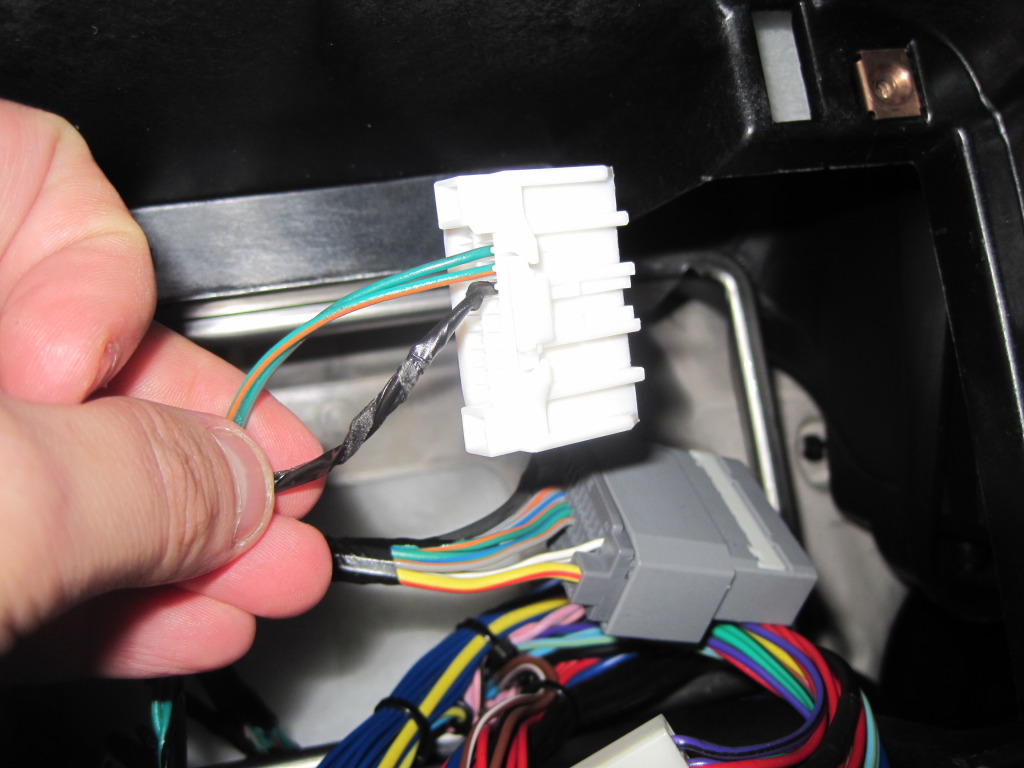
I think this might not be an issue with my lockpic because I tried to connect it back into my headunit bypassing the lockpick and the cam still looked fuzzy. It was night time so wasnt really a good test but my wifes 11 grand carvan backup cam looks so much better then mine does after doing the lockpick... oh well like mazada3ndp said i consider it a tradeoff but if someone figures something else out to restore that pretty picture back I would be very grateful
I think this might not be an issue with my lockpic because I tried to connect it back into my headunit bypassing the lockpick and the cam still looked fuzzy. It was night time so wasnt really a good test but my wifes 11 grand carvan backup cam looks so much better then mine does after doing the lockpick... oh well like mazada3ndp said i consider it a tradeoff but if someone figures something else out to restore that pretty picture back I would be very grateful
Last edited by simpsonsr0ck; Aug 6, 2012 at 05:18 PM.
Professional
Joined: Aug 2011
Posts: 111
Likes: 0
thats the wire. WTF i cant believe they left a bare wire like that... I wonder if someone put an aligator clips on it and tried grounding it , if that would improve things... I would assume thats a ground wire, right?
Thread Starter
|
Professional
Joined: Aug 2011
Posts: 132
Likes: 0
I was hoping this would fix my fuzzy cam too but no such luck. I think this is the connector and wire your referring too right?

I think this might not be an issue with my lockpic because I tried to connect it back into my headunit bypassing the lockpick and the cam still looked fuzzy. It was night time so wasnt really a good test but my wifes 11 grand carvan backup cam looks so much better then mine does after doing the lockpick... oh well like mazada3ndp said i consider it a tradeoff but if someone figures something else out to restore that pretty picture back I would be very grateful
I think this might not be an issue with my lockpic because I tried to connect it back into my headunit bypassing the lockpick and the cam still looked fuzzy. It was night time so wasnt really a good test but my wifes 11 grand carvan backup cam looks so much better then mine does after doing the lockpick... oh well like mazada3ndp said i consider it a tradeoff but if someone figures something else out to restore that pretty picture back I would be very grateful
thinking about it further, mine being so exposed and silver...maybe that is a ground??
Trending Topics

Registered User
Joined: Apr 2012
Posts: 5
Likes: 0
Hi guys,
Has anyone seen/tried this workaround?
http://www.jeepgarage.org/showthread...210#post606210
I'm still considering buying the lockpick but I can't get past having to live with the fuzzy backup camera issue.
Has anyone seen/tried this workaround?
http://www.jeepgarage.org/showthread...210#post606210
I'm still considering buying the lockpick but I can't get past having to live with the fuzzy backup camera issue.

Rookie
Joined: Sep 2011
Posts: 77
Likes: 0
Hi guys,
Has anyone seen/tried this workaround?
http://www.jeepgarage.org/showthread...210#post606210
I'm still considering buying the lockpick but I can't get past having to live with the fuzzy backup camera issue.
Has anyone seen/tried this workaround?
http://www.jeepgarage.org/showthread...210#post606210
I'm still considering buying the lockpick but I can't get past having to live with the fuzzy backup camera issue.
Here are the pics so no one else will have to register just to see them in the Jeep forum.
First posting pic:

Lower posting with 6 pics
Pic#1

Pic#2

Pic#3

Pic#4

Pic#5
Pic#6

Rookie
Joined: Sep 2011
Posts: 77
Likes: 0
-Update
Finally did this mod. Okay, it fixed the dim washed out picture problem. It is completely as it was before the lock pick. Here is a link to a pic of the bad video. https://dodgeforum.com/forum/3rd-gen...install-7.html
Now for the down side, The auto cameras will not work anymore (if you bought extra cameras for front and turn signals) and the shortcut to a camera (where you press the phone button twice) will now only show the rear camera. The rear camera will not turn on from the LockPick menu (not too big of a deal because pushing the phone button twice will now only switch to that video). The front camera still works fine but the only way to access it is through the menu now (I used the phone button shortcut for this before).
-Install
Remove the LockPick harness from the vehicle. On the LockPick harness, plug the two white connectors together. Follow the pictures from here. Basically your just bypassing the LockPick for the rear camera feed and sending it straight to the radio. It must have used that feed for sending in the other cameras in auto mode.
Finally did this mod. Okay, it fixed the dim washed out picture problem. It is completely as it was before the lock pick. Here is a link to a pic of the bad video. https://dodgeforum.com/forum/3rd-gen...install-7.html
Now for the down side, The auto cameras will not work anymore (if you bought extra cameras for front and turn signals) and the shortcut to a camera (where you press the phone button twice) will now only show the rear camera. The rear camera will not turn on from the LockPick menu (not too big of a deal because pushing the phone button twice will now only switch to that video). The front camera still works fine but the only way to access it is through the menu now (I used the phone button shortcut for this before).
-Install
Remove the LockPick harness from the vehicle. On the LockPick harness, plug the two white connectors together. Follow the pictures from here. Basically your just bypassing the LockPick for the rear camera feed and sending it straight to the radio. It must have used that feed for sending in the other cameras in auto mode.
Last edited by fuzzyb; Aug 27, 2012 at 01:31 PM. Reason: Added Link