



Disabling Mirrored Image (Lockpick CHR550 Mini Cam) Question


Thread Starter
|
Rookie
Joined: Aug 2012
Posts: 70
Likes: 0
From: Chevy Chase
 Disabling Mirrored Image on Front Camera (Lockpick CHR550) Question
So I've searched long and hard on just about every forum and I've read and re-read the instructions from Coastal Tech, yet I still haven't found my answer...
I recently installed the CHR550 lockpick with an additional front camera but, of course, the camera comes with Mirrored Image Enabled, as I'm assuming most use it as a rear camera. I have the front camera mounted, wired, and functional but the image is inverted from left to right (because mirrored image is enabled).
I've tried everything from messing with the power source and trying different cables but no dice. The yellow RCA cable is hooked into the front camera port on lockpick, black wire is in ground, and red wire is in the additional camera power source. From what I've read, it looks like previous models of the lockpick (V4) and associated mini camera had two jumpers connected to the camera - for disabling/enabling mirrored image and distance markers.
Does anyone know what I need to do to disable mirror image?
Appreciate any help or guidance that you guys can give. Thank you.
I recently installed the CHR550 lockpick with an additional front camera but, of course, the camera comes with Mirrored Image Enabled, as I'm assuming most use it as a rear camera. I have the front camera mounted, wired, and functional but the image is inverted from left to right (because mirrored image is enabled).
I've tried everything from messing with the power source and trying different cables but no dice. The yellow RCA cable is hooked into the front camera port on lockpick, black wire is in ground, and red wire is in the additional camera power source. From what I've read, it looks like previous models of the lockpick (V4) and associated mini camera had two jumpers connected to the camera - for disabling/enabling mirrored image and distance markers.
Does anyone know what I need to do to disable mirror image?
Appreciate any help or guidance that you guys can give. Thank you.
Last edited by Dodgemack; Oct 5, 2012 at 08:47 PM.

Rookie
Joined: Sep 2011
Posts: 77
Likes: 0
I have the same lockpick as you. The place where I mirror image the camera or add the reverse guide lines is on the camera its self. A few inches from the camera the single cable breaks out into four (video, power, mirror and lines jumpers). I have the small round camera that does not have any IR lights built into it.
Thread Starter
|
Rookie
Joined: Aug 2012
Posts: 70
Likes: 0
From: Chevy Chase
Thanks for the reply fuzzy. I'm not sure I see what you're referring to. The camera is connected to what appears to be a rubber splitter that splits off to two cables (yellow RCA and black cable for wiring). Are the extra two cables somehow intertwined into the rubber splitter thing?
Did you have to cut open the rubber rubber thing that contains and splits the camera wires? I should get a photo of how mine looks.
Did you have to cut open the rubber rubber thing that contains and splits the camera wires? I should get a photo of how mine looks.
Last edited by Dodgemack; Oct 6, 2012 at 04:23 PM.
Thread Starter
|
Rookie
Joined: Aug 2012
Posts: 70
Likes: 0
From: Chevy Chase
@fuzzyb below is the camera cable (excuse the poor wiring job but it's temporary)
To the right of the rubber thing is the single cable that leads to the camera and obviously to the left is the yellow RCA and black ground/power. I'm not sure where the other 2 jumper cables to enable/disable mirrored image and distance markings would be :-/
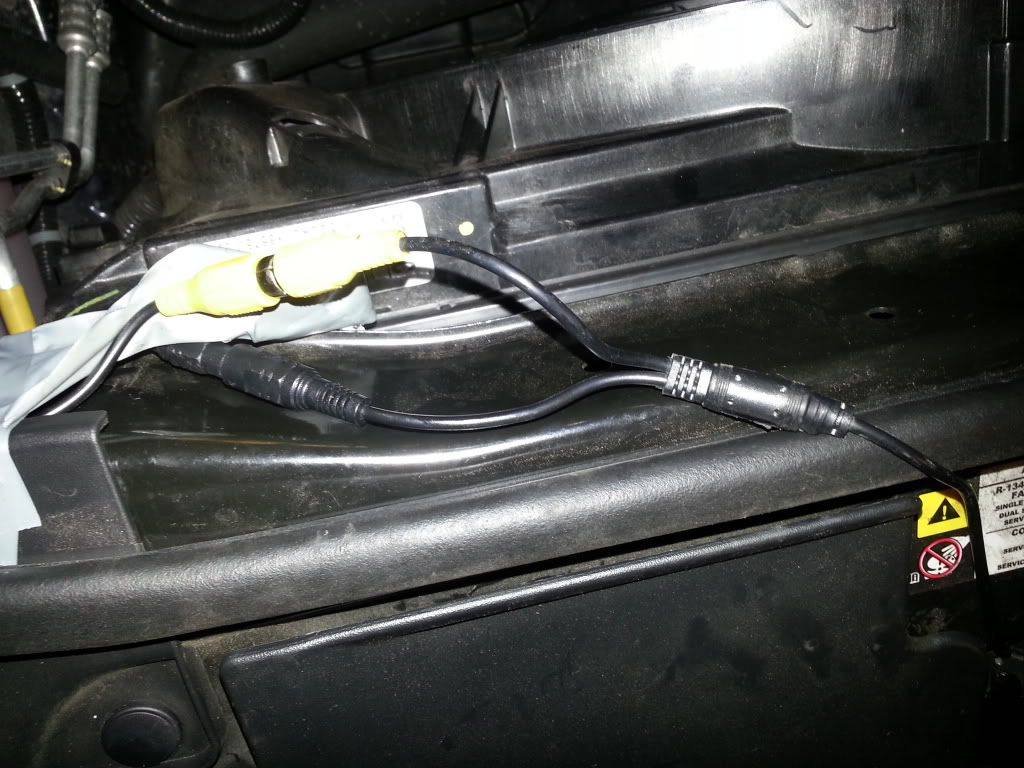
To the right of the rubber thing is the single cable that leads to the camera and obviously to the left is the yellow RCA and black ground/power. I'm not sure where the other 2 jumper cables to enable/disable mirrored image and distance markings would be :-/
Rookie
Joined: Sep 2011
Posts: 77
Likes: 0
Here is my camera breackout cable:

As you can see I have a few more cables coming from the camera.
I have the camera MINICAM221
The half circle thing in the pic is a Zip Tie
As you can see I have a few more cables coming from the camera.
I have the camera MINICAM221
The half circle thing in the pic is a Zip Tie
Last edited by fuzzyb; Oct 8, 2012 at 07:04 PM. Reason: Added Zip Tie
Thread Starter
|
Rookie
Joined: Aug 2012
Posts: 70
Likes: 0
From: Chevy Chase
Thanks fuzzy.
I've sorted out my issue and apparently had received the incorrect camera; the camera I received is meant for rear use only so it is only mirror image. Proper mini can from coastaletech has been ordered.
With that said, does anyone want to buy this rear camera I have? Offers welcome!
I've sorted out my issue and apparently had received the incorrect camera; the camera I received is meant for rear use only so it is only mirror image. Proper mini can from coastaletech has been ordered.
With that said, does anyone want to buy this rear camera I have? Offers welcome!

Veteran
Joined: Aug 2012
Posts: 308
Likes: 0
From: New York State
Trending Topics
Thread Starter
|
Rookie
Joined: Aug 2012
Posts: 70
Likes: 0
From: Chevy Chase
I'm not planning to return it as I kind of caused some wear to the cable due to a sloppy first time install/attempt at discretely wiring it. I'll likely just re-sell on eBay and someone can save a couple bucks.
