



UConnect Upgraded


Thread Starter
|
Amateur
Joined: Jul 2015
Posts: 37
Likes: 0
From: Slippery Rock, PA
 UConnect Upgraded
Hi All,
I've upgraded my 2012 430N/RHB Uconnect this evening from 33.00.41 to 50.00.07. Huge improvement in appearance. If you haven't done it, I highly recommend. Gone is the blocky blue UI traded for very Dodge-y black and red. SiriusXM channel logos appear now, soft buttons are rounded, Its a much more up-to-date look. I've not visited the technical improvements, save for checking functionality with my phone (Moto MAXX (not RAZR MAXX)). Phone function is the entire reason I upgraded in the first place.)
R/T still tells me my functions aren't available... Grrr...
Anyone know if there is a more up to date version for 430N/RHB?
Thanks!
I've upgraded my 2012 430N/RHB Uconnect this evening from 33.00.41 to 50.00.07. Huge improvement in appearance. If you haven't done it, I highly recommend. Gone is the blocky blue UI traded for very Dodge-y black and red. SiriusXM channel logos appear now, soft buttons are rounded, Its a much more up-to-date look. I've not visited the technical improvements, save for checking functionality with my phone (Moto MAXX (not RAZR MAXX)). Phone function is the entire reason I upgraded in the first place.)
R/T still tells me my functions aren't available... Grrr...
Anyone know if there is a more up to date version for 430N/RHB?
Thanks!

Rookie
Joined: Nov 2014
Posts: 98
Likes: 0
as far as I know the 50.00.07 is the latest firmware. I upgraded because I was desperate to fix the crazy EQ parameters the the 430N originally had. 50.00.07 was the jackpot for me. the EQ is normal (meaning no unfixable boomy mid bass). now it just has the normal Chrysler too much bass that I can tweak out without dropping Mids all the way down.
I love the 50.00.07 just for that. I've gotten to like the black background vs the blue. I use Blackberry and the radio has always worked well with both my previous Q10 and my new Classic.
I love the 50.00.07 just for that. I've gotten to like the black background vs the blue. I use Blackberry and the radio has always worked well with both my previous Q10 and my new Classic.

Amateur
Joined: May 2015
Posts: 36
Likes: 0
I just did the recent update however I have no idea what version it is or what I had however I didn't notice any difference at all, other than they tell me the security issue has been resolved.
btw, it was very easy and quick to do it with a simple flash drive.
btw, it was very easy and quick to do it with a simple flash drive.

Professional
Joined: Jul 2012
Posts: 146
Likes: 1
Update 50.01.01 is out!
Rehashing this thread since update 50.01.01 is now out for the RHB-RBZ (mine's the RBZ): http://mygig-disk.com/download-rbz.php
I updated mine and had a slight scare so wanted everyone to know. I downloaded the file, put the .iso onto a CD-R and went to the Durango. You must have at least the 33.01.23 to update, which was not an issue as 50.00.07 was installed. I've previously updated this 2011 from the 23.04.41 to 33.01.23 to 50.00.07, so I figured I've got this down. Got the radio to start up, put the disk in, it recognized the disk and started installing the files (sorry, didn't get pics of this). It installed the files, asked to reboot which it did... and then did again... and again... and again... yeah, the sickening feeling hit my stomach, the radio's bricked.
I dig again online after quitting (I actually had to pull the radio fuse because even with the car turned off it would constantly reboot). I find this info about the rebooting issue: http://mygig-disk.com/loop-test-rhb-rbz.php?site=rbz
So after looking at this I figured either my hard drive or radio's crapped out and I have to run the test they mention of pulling out the hard drive to see if it boots up. I pulled out the hard drive like the link states, other than I didn't have enough slack to leave the radio connected (MAKE SURE YOU KNOW YOUR SECURITY PIN IF YOU DISCONNECT YOUR RADIO) so I pulled mine all the way out (hard drive is the two screws and cover plate on the lower right of the picture):

Temp installed it without the hard drive, reconnected the fuse and it went to the boot screen, then the entire screen goes white (I think, great radio's trashed):

And just as I'm about to go to pull the fuse, the no kidding software update screen shows up and started progressing:
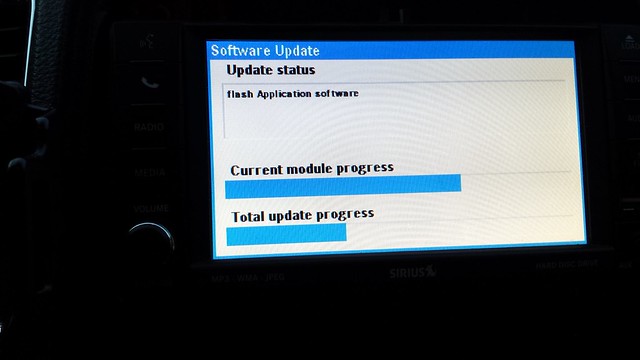
So I eagerly wait for it to install, which it did. It goes to reboot (which takes a little longer the first time after the update and made me nervous again) and came up fine without the hard drive. I thought ok, the hard drive might be done, but it's odd that the software update hadn't even processed, so I figure what the heck, nothing to lose and reinstall the hard drive to see if it goes into the reboot cycle again. I powered it up after installing and zero issues, booted perfectly fine and no problems reading the hard drive.
So, moral of the story, update 50.01.01 is out. I have felt the sound is greatly improved, but haven't seen any other differences on the RBZ other than that. Hopefully people don't run into the issues I did, but if you do don't panic. It may just be a glitch and try removing the hard drive to power up before giving up.
I updated mine and had a slight scare so wanted everyone to know. I downloaded the file, put the .iso onto a CD-R and went to the Durango. You must have at least the 33.01.23 to update, which was not an issue as 50.00.07 was installed. I've previously updated this 2011 from the 23.04.41 to 33.01.23 to 50.00.07, so I figured I've got this down. Got the radio to start up, put the disk in, it recognized the disk and started installing the files (sorry, didn't get pics of this). It installed the files, asked to reboot which it did... and then did again... and again... and again... yeah, the sickening feeling hit my stomach, the radio's bricked.
I dig again online after quitting (I actually had to pull the radio fuse because even with the car turned off it would constantly reboot). I find this info about the rebooting issue: http://mygig-disk.com/loop-test-rhb-rbz.php?site=rbz
So after looking at this I figured either my hard drive or radio's crapped out and I have to run the test they mention of pulling out the hard drive to see if it boots up. I pulled out the hard drive like the link states, other than I didn't have enough slack to leave the radio connected (MAKE SURE YOU KNOW YOUR SECURITY PIN IF YOU DISCONNECT YOUR RADIO) so I pulled mine all the way out (hard drive is the two screws and cover plate on the lower right of the picture):
Temp installed it without the hard drive, reconnected the fuse and it went to the boot screen, then the entire screen goes white (I think, great radio's trashed):
And just as I'm about to go to pull the fuse, the no kidding software update screen shows up and started progressing:
So I eagerly wait for it to install, which it did. It goes to reboot (which takes a little longer the first time after the update and made me nervous again) and came up fine without the hard drive. I thought ok, the hard drive might be done, but it's odd that the software update hadn't even processed, so I figure what the heck, nothing to lose and reinstall the hard drive to see if it goes into the reboot cycle again. I powered it up after installing and zero issues, booted perfectly fine and no problems reading the hard drive.
So, moral of the story, update 50.01.01 is out. I have felt the sound is greatly improved, but haven't seen any other differences on the RBZ other than that. Hopefully people don't run into the issues I did, but if you do don't panic. It may just be a glitch and try removing the hard drive to power up before giving up.

Record Breaker


Joined: Feb 2015
Posts: 1,131
Likes: 55
From: Iowa
I upgraded my system this weekend to 50.01.01 (thank you for the heads up!). I burned the ISO image to a CD and did the install that way. Fortunately for me, the upgrade went perfectly fine, no issues with restarts. I haven't driven it a whole lot with the new load but so for it does seem like the sound quality is improved. I haven't noticed any other changes yet.
-Rod
-Rod

Amateur
Joined: Jul 2015
Posts: 49
Likes: 2
Tangentially related question since you guys are thinking about software revisions:
Does anyone know what Nav database version is going into recently delivered Durangos?
I recall test driving a late 15-built model last year and it's database started with 2012xxxx. I would be astounded to find that, should I ever decide to pull the trigger on one of these, a 16 MY vehicle would not have a 2016-based nav database.
Does anyone know what Nav database version is going into recently delivered Durangos?
I recall test driving a late 15-built model last year and it's database started with 2012xxxx. I would be astounded to find that, should I ever decide to pull the trigger on one of these, a 16 MY vehicle would not have a 2016-based nav database.

Registered User
Joined: Jun 2016
Posts: 6
Likes: 0
my rbz is in a ram but maybe going to 50.01.01 from 50.00.07 will make the camera delay feature work. 50.00.07 added it but when you enable it the camera screen just shows black after you shift out of reverse. guess i'll have to update and find out.
Trending Topics

Record Breaker
Joined: Feb 2015
Posts: 1,131
Likes: 55
From: Iowa
The factory Nav showing traffic patterns is through the Sirius Nav Traffic service. If you cancel your Sirius subscription, that feature will go away as well. It's a layer on the Nav, not part of the base maps.
-Rod
-Rod

Registered User
Joined: Jun 2016
Posts: 11
Likes: 0
From: Clearwater, Fl
I would like to know the same since I have the same ride and year. I'm thinking mine has the 730N, but I'm not certain.

