


Superchips Questions and Updates


Veteran
Joined: Aug 2008
Posts: 482
Likes: 0
From: CT

I had my doubts when I plugged it into my truck since I have an 07 flex-fuel, but it worked just fine. I gotta say my hat is off to Superchips, the part throttle acceleration difference is fantastic! I did notice it raised shift points a couple mph, nothing dramatic though. The truck also seems to run lower rpm now at speed, maybe 50-100 less in 5OD lock.
I can now also answer my own question about octane. Even here over 4,500 feet, I still need to run 87 octane for the 87 octane tune. I was getting some uphill acceleration knock with 85.
The only issue I am having is getting the speedo set correctly. The default was for 31.75 inch tires, but I have the factory 20s with 33 inch tires. When I loaded 33 and drove around, my speedo is fast about 3mph at 60mph. I then tried 33.25, but that didn't quite fix it. Did I miss something? I left the final drive ratio at 3.92...
I can now also answer my own question about octane. Even here over 4,500 feet, I still need to run 87 octane for the 87 octane tune. I was getting some uphill acceleration knock with 85.
The only issue I am having is getting the speedo set correctly. The default was for 31.75 inch tires, but I have the factory 20s with 33 inch tires. When I loaded 33 and drove around, my speedo is fast about 3mph at 60mph. I then tried 33.25, but that didn't quite fix it. Did I miss something? I left the final drive ratio at 3.92...

All Star
Joined: Dec 2005
Posts: 809
Likes: 0
From: GA
Superchips calculates actual tire height measured from the ground to the top of the tire. That's what will go into the tire size option. If you have stock tires, no need to change the setting that's there.
Sil

3rd gen Ram, Newbies
Joined: May 2008
Posts: 3,815
Likes: 0
From: Chicago
unless you ahve the 20" rims that came with mayn of our trucks. then your tire size is 33"
All Star
Joined: Dec 2005
Posts: 809
Likes: 0
From: GA
I had my doubts when I plugged it into my truck since I have an 07 flex-fuel, but it worked just fine. I gotta say my hat is off to Superchips, the part throttle acceleration difference is fantastic! I did notice it raised shift points a couple mph, nothing dramatic though. The truck also seems to run lower rpm now at speed, maybe 50-100 less in 5OD lock.
I can now also answer my own question about octane. Even here over 4,500 feet, I still need to run 87 octane for the 87 octane tune. I was getting some uphill acceleration knock with 85.
The only issue I am having is getting the speedo set correctly. The default was for 31.75 inch tires, but I have the factory 20s with 33 inch tires. When I loaded 33 and drove around, my speedo is fast about 3mph at 60mph. I then tried 33.25, but that didn't quite fix it. Did I miss something? I left the final drive ratio at 3.92...
I can now also answer my own question about octane. Even here over 4,500 feet, I still need to run 87 octane for the 87 octane tune. I was getting some uphill acceleration knock with 85.
The only issue I am having is getting the speedo set correctly. The default was for 31.75 inch tires, but I have the factory 20s with 33 inch tires. When I loaded 33 and drove around, my speedo is fast about 3mph at 60mph. I then tried 33.25, but that didn't quite fix it. Did I miss something? I left the final drive ratio at 3.92...

Just keep it at the default (31.75) setting for the factory 20's. If you physically measure your tires from the ground to the top of the tire, they'll measure about 31.75. If you went bigger or smaller on tires in the future, this would be the way to change the tire size option in Superchips.
Sil
All Star
Joined: Dec 2005
Posts: 809
Likes: 0
From: GA
Sil

Record Breaker
Joined: Jul 2007
Posts: 1,300
Likes: 0
From: Back in NY!!

Veteran
Joined: Jan 2007
Posts: 413
Likes: 1
From: Oklahoma City, OK
That is kind of what I was thinking. Unfortunately, I also just finished installing my Transgo shift kit, and I didn't waste any time uploading the Superchips right after that...so it might be a slight line pressure increase helping the TQ lock better?
Record Breaker
Joined: Jul 2007
Posts: 1,300
Likes: 0
From: Back in NY!!
All Star
Joined: Dec 2005
Posts: 809
Likes: 0
From: GA

Sharing a few more pictures of menus...
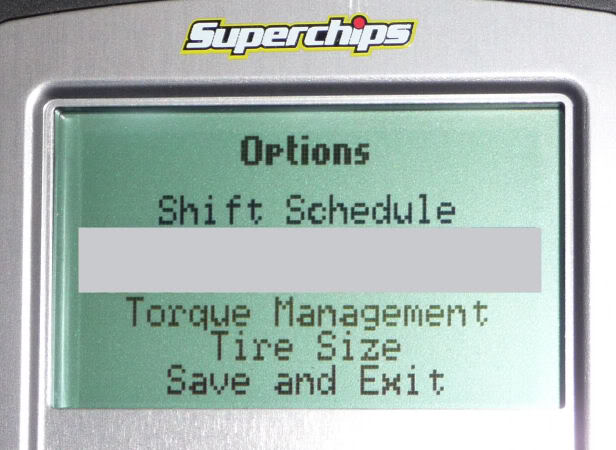
Shift Schedule (PT up/dn) and Torque Management (WOT/PT) in the Options screen.
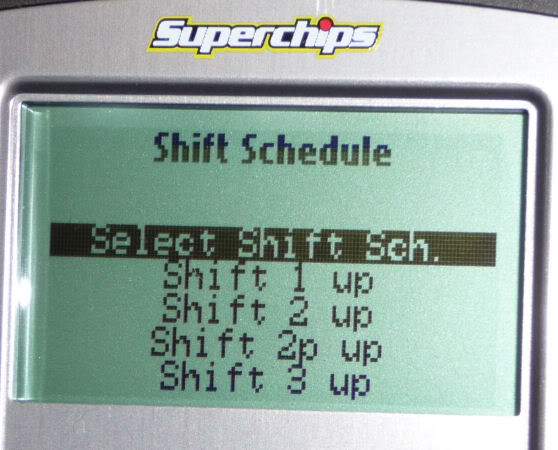
Entering Shift Schedule you'll see Select Shift Sch. (Time to chose what you want to do with your PT up/dn shifts)
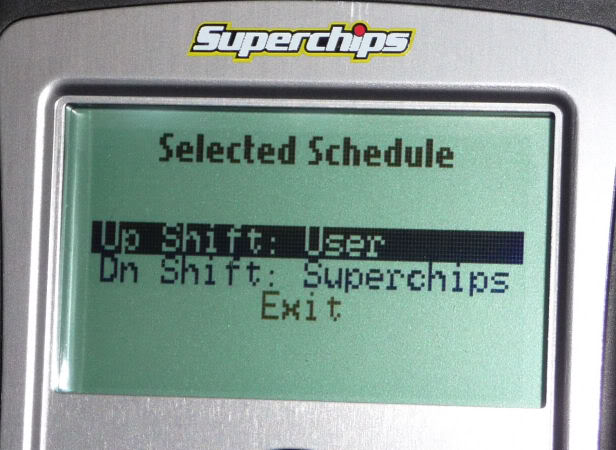
Entering Select Shift Sch. you can choose Up Shift and/or Dn Shift. (In this picture, User for up shifts and Superchips for dn shifts selected)
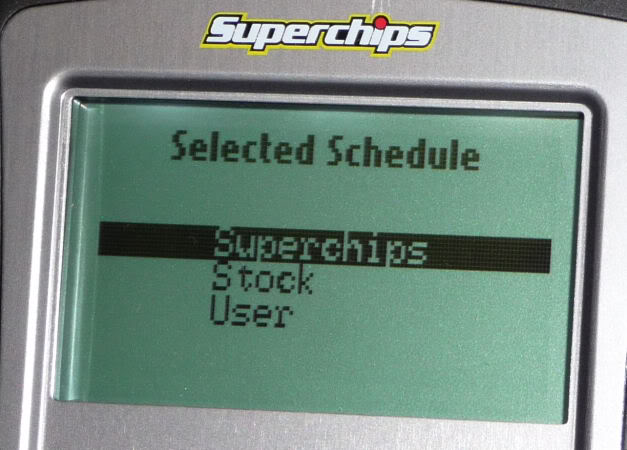
Here's what your choices are in Up Shift and Down Shift. (You can choose Stock as well)
Torque Management (WOT and PT; PT TM will have 4 RPM ranges you can adjust per shift)
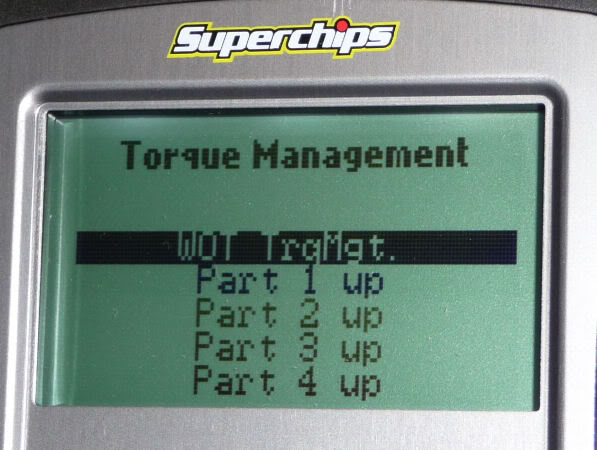
WOT TrqMgt selected. (Everything stock in picture)
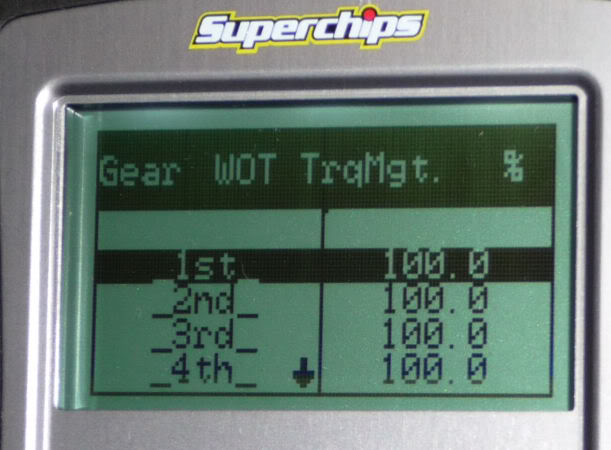
What you see here could change slightly. Since we're nearing the end of the alpha, this may be pretty much what it could look like. It's very user friendly. If you like, when User is selected, you'll have control of everything. This is going to be a very powerful transmission tuning program and no one will have anything like it for our trucks.
Sil
Shift Schedule (PT up/dn) and Torque Management (WOT/PT) in the Options screen.
Entering Shift Schedule you'll see Select Shift Sch. (Time to chose what you want to do with your PT up/dn shifts)
Entering Select Shift Sch. you can choose Up Shift and/or Dn Shift. (In this picture, User for up shifts and Superchips for dn shifts selected)
Here's what your choices are in Up Shift and Down Shift. (You can choose Stock as well)
Torque Management (WOT and PT; PT TM will have 4 RPM ranges you can adjust per shift)
WOT TrqMgt selected. (Everything stock in picture)
What you see here could change slightly. Since we're nearing the end of the alpha, this may be pretty much what it could look like. It's very user friendly. If you like, when User is selected, you'll have control of everything. This is going to be a very powerful transmission tuning program and no one will have anything like it for our trucks.
Sil

