When you click on links to various merchants on this site and make a purchase, this can result in this site earning a commission. Affiliate programs and affiliations include, but are not limited to, the eBay Partner Network.
Dodge CaravanThe Dodge Caravan is the best selling mini van from Dodge. How many Dodge Caravan owners here at DodgeForum.com would agree? Discuss it now!
I'm having an issue with my van where the van will intermittently sound the warning chime, flash all the idiot lights and turn signals, and run the wipers. A couple of threads on this forum pointed to a TIPM issue, and I may yet have a TIPM issue, but another forum suggested to check the wire bundle that goes into the driver's door.
I took the door apart and lo and behold, there was one wire completely broken and several others that I could tell were broken and only held together by the insulation. The snapped wire ran to the door position switch (my courtesy lights and door open indicator had not been working for some time with the driver's door), while others ran to what I believe was an airbag sensor in the door and possibly front window or power locks. All of the wire breaks were within 4 inches of the connector to the body wide harness, and located in the rubber boot you see when you open the door. These wires were all 20-22 AWG stranded wire - very thin to begin with (not much bigger than the individual wires in an ethernet or phone cable), and subject to frequent bending and stretching from the opening and closing of the driver's door. I used butt splices to reconnect all the wires that looked to be broken inside the insulation, but when I put everything back together I still had the same problem.
I picked up some 18 AWG wire (the smallest gauge I could find at the major chain auto parts store - doesn't that make you wonder why Chrysler used even smaller gauge wire?) and plan to splice in some wire overlays on wires that might have had more than one break and might even do this on wires where I didn't see a break, just to be on the safe side. For now I've pulled the fuse for the driver door module just so that my wife can have a driveable vehicle, but she can't open the front windows or use the power locks in this state, plus the airbag light comes on, probably because of that sensor in the door. I'll keep you posted on my results.
I took the door apart again and did a few things before I fixed anything. First I turned the key to on with both door harness connectors disconnected. No problem. Then I turned it on with only the green connector connected. Again, no problem. Then I connected only the gray connector and the lights and wipers went crazy. I checked every wire going into that gray connector for continuity, cut and reconnected some that looked broken, and ran one overlay when I couldn't find where the wire was broken. Put everything back together and the lights and wipers still went crazy.
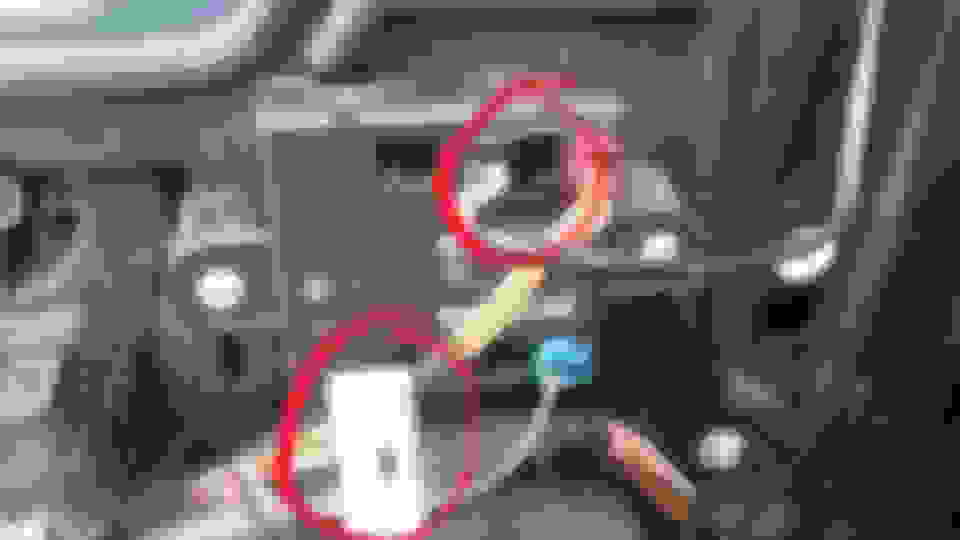
By pure accident I noticed that I had no problem (except no front window, outside mirror, or power lock control) when the connector in port #3 of the door module was disconnected. If I remember correctly the wires were white/orange, white/gray, and one other that I can't remember. All of them had continuity throughout the door bundle. I'm now thinking the door module has gone bad and is feeding junk data to the PCM/BCM. Any thoughts?
Those two wires you ID'd on that connector are the CAN data bus feeds. A typical bus troubleshooting step is to disconnect modules one at a time and see if whatever bus issue disappears. Seems you inadvertently did that. Could the door module be the problem? No guarantee but sure could.
The other two wires on that connector should be power (pin #5 red/green) from 25 amp fuse J4 and ground (pin #4 Black).
Those two wires you ID'd on that connector are the CAN data bus feeds. A typical bus troubleshooting step is to disconnect modules one at a time and see if whatever bus issue disappears. Seems you inadvertently did that. Could the door module be the problem? No guarantee but sure could.
The other two wires on that connector should be power (pin #5 red/green) from 25 amp fuse J4 and ground (pin #4 Black).
Thanks for that info. For my edification what do the other three connectors go to? Looks like the one in port 2 (left side of my upper circle) goes to the driver's side mirror. And why would my front passenger door switches be dead but I can still control the second row windows and the third row vent windows from the driver's switches with that CAN data bus plug pulled? I guess a better way of asking this is what exactly does the door module do?
Update: I replaced the driver door module and the van no longer flashes the lights or runs the wipers or any of that stuff. But now the front passenger door window and lock switches are dead and I can't control the front passenger window from the driver's side either. Rear sliding windows and vent windows work fine. Do I need to replace the front passenger door module as well?
Hm. Not quite clear. Is this an all new problem? Were they working with the original module installed? If yes you may have installed a bad module. Did you replace the module with the correct one? Do the part numbers match? Might consider revisiting that wire bundle and those connections. Passenger module? I would say no but my eyes aren't on the van.
Seems like I send everyone wire diagrams. Did I send one to you?
Yes, all my windows were working fine before I replaced the door module. When I first installed the new one the driver's door button would unlock but not lock the doors, but after disconnecting the battery for a few minutes and then running a few cycles that function now works. When I replaced the module I didn't touch the connectors from the door harness to the body harness.
I bought the module online from a CJD dealership in Florida. I searched on part number 04602677AK, which is what is printed on the module. Several sites said that 05026861AD replaces several door modules including mine, so that's what I went with.
If you could send me a wiring diagram so that I at least know where to look next, that would be great.
"If you could send me a wiring diagram so that I at least know where to look next, that would be great."
Ok but I'll need an email address to send it to. Send it in a private message. How? Click Cougar41 at left. Confirm this is for your 2008 soccer mom exec transport. (lol)
I'm having an issue with my van where the van will intermittently sound the warning chime, flash all the idiot lights and turn signals, and run the wipers. A couple of threads on this forum pointed to a TIPM issue, and I may yet have a TIPM issue, but another forum suggested to check the wire bundle that goes into the driver's door.
I took the door apart and lo and behold, there was one wire completely broken and several others that I could tell were broken and only held together by the insulation. The snapped wire ran to the door position switch (my courtesy lights and door open indicator had not been working for some time with the driver's door), while others ran to what I believe was an airbag sensor in the door and possibly front window or power locks. All of the wire breaks were within 4 inches of the connector to the body wide harness, and located in the rubber boot you see when you open the door. These wires were all 20-22 AWG stranded wire - very thin to begin with (not much bigger than the individual wires in an ethernet or phone cable), and subject to frequent bending and stretching from the opening and closing of the driver's door. I used butt splices to reconnect all the wires that looked to be broken inside the insulation, but when I put everything back together I still had the same problem.
I picked up some 18 AWG wire (the smallest gauge I could find at the major chain auto parts store - doesn't that make you wonder why Chrysler used even smaller gauge wire?) and plan to splice in some wire overlays on wires that might have had more than one break and might even do this on wires where I didn't see a break, just to be on the safe side. For now I've pulled the fuse for the driver door module just so that my wife can have a driveable vehicle, but she can't open the front windows or use the power locks in this state, plus the airbag light comes on, probably because of that sensor in the door. I'll keep you posted on my results.
I didn’t look at when this was wrote but figured I’d comment for anyone who might look this up later on. You’re in the right place but the wire that’s causing your flashing and dinging is up just a little further on the other side of the rubber boot. Some of my wires were also broken up there. I also had almost all the wires broken when I opened up the boot and found the cluster I snipped and taped and got my speaker, windows, locks, door dinger, back to working but it didn’t fix the flashing or the dinging or the wiper blades. So I took the runner boot completely off and side rhr
I took the door apart again and did a few things before I fixed anything. First I turned the key to on with both door harness connectors disconnected. No problem. Then I turned it on with only the green connector connected. Again, no problem. Then I connected only the gray connector and the lights and wipers went crazy. I checked every wire going into that gray connector for continuity, cut and reconnected some that looked broken, and ran one overlay when I couldn't find where the wire was broken. Put everything back together and the lights and wipers still went crazy.
By pure accident I noticed that I had no problem (except no front window, outside mirror, or power lock control) when the connector in port #3 of the door module was disconnected. If I remember correctly the wires were white/orange, white/gray, and one other that I can't remember. All of them had continuity throughout the door bundle. I'm now thinking the door module has gone bad and is feeding junk data to the PCM/BCM. Any thoughts?
Follow the wires up further the problem lies on the other side of the connector piece that you plug the door wire bundle into... I'm terrible at explaining. But I had the same issues and fixed all the wires in the door and it didn't fix the problem but I noticed when I was applying pressure while pushing the connector piece back into the slot the wipers and lights and sounds went off. So I unplugged what I had just plugged back in and what do you know?! The wires in the other side of the slot that you plug into were broken as well I hope I'm explaining that right.
Best bet is to remove your driver's door unplug the erie harness and set them aside. You won't have enough room to work on fixing the wires with that still on there. Pull that out as much as you can and just wiggle them til you find which ones are causing the glitch.



 Driver door wire bundle