



How to Replace Radio on 2012 2500 ST?


Captain
Joined: Sep 2011
Posts: 507
Likes: 9

remove the rubber plate under the dodge logo. there are 2 screws there. then the panel just pops off and 4 7mm screws hold in the radio
top
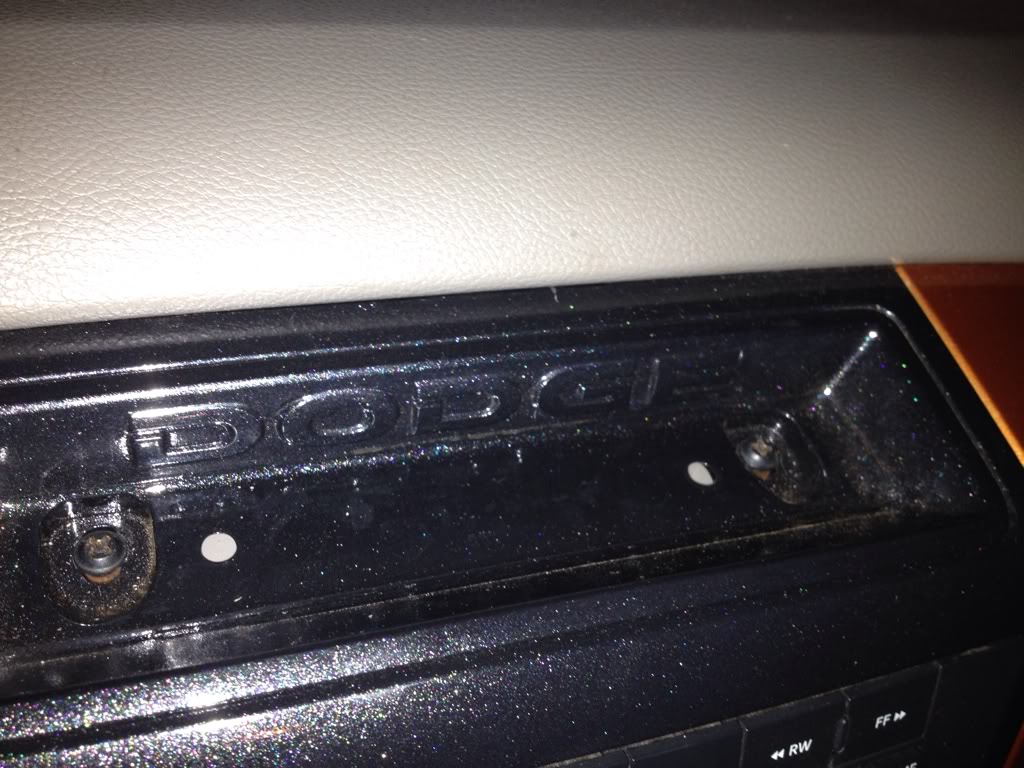
and near inverter if you have one
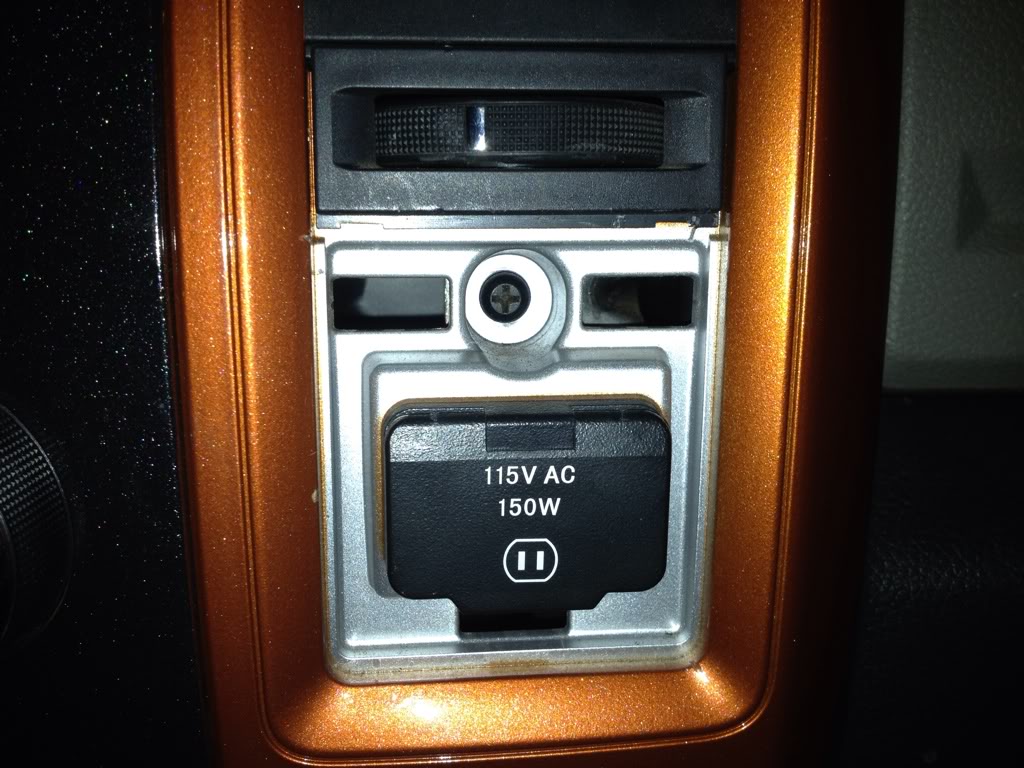
top
and near inverter if you have one
Last edited by Cmerritt84; Sep 23, 2012 at 07:01 PM.
Captain
Joined: Sep 2011
Posts: 507
Likes: 9
then you should just have to undo the top 2 screws and just pull it off. the whole panel has clips holding it on. theyre tight on there. get under a corner and work your way around them. may have to move gear shift to D position to get it off. and by the way its torx screws that hold that on. i replaced mine with phillips

All Star
Joined: Jan 2010
Posts: 824
Likes: 1
From: Alberta
You might run into issues with programming tho.
See each deck has the vehicles VIN imprinted and coded in there. At least thats what my dealer told me when I had my 730N replaced. (USB quit working) I had to wait one full month before the new one came in. It had to come from the factory all preset with all the trucks settings. It could be because its a NAV unit, something to with tracking from the GPS or something I don't know.
BUT if that is not true, and maybe someone on here can clarify that or not. You are going to have issues with the NAV portion of the deck. Your truck is not fitted for nav, so just a simple plug and play is not going to work. To my knowledge anyways. Your truck needs a GPS antenna installed, and the truck WILL need to be flashed for it to work properly. IE: speed, parkbrake, and most especially your EVIC. Now if your not worried about nav, then ok forget this last part of the post haha...
See each deck has the vehicles VIN imprinted and coded in there. At least thats what my dealer told me when I had my 730N replaced. (USB quit working) I had to wait one full month before the new one came in. It had to come from the factory all preset with all the trucks settings. It could be because its a NAV unit, something to with tracking from the GPS or something I don't know.
BUT if that is not true, and maybe someone on here can clarify that or not. You are going to have issues with the NAV portion of the deck. Your truck is not fitted for nav, so just a simple plug and play is not going to work. To my knowledge anyways. Your truck needs a GPS antenna installed, and the truck WILL need to be flashed for it to work properly. IE: speed, parkbrake, and most especially your EVIC. Now if your not worried about nav, then ok forget this last part of the post haha...
Trending Topics

Thread Starter
|
Registered User
Joined: Aug 2012
Posts: 10
Likes: 0
How to Replace a Radio on a 2012 2500 ST
All good questions and concerns, I did spend some time at my dealer's parts counter, he seems pretty good, he did some research, and said, I should be able to do it, but, certainly, do need the GPS antenna, and,
Another thing I just thought of, is, my truck came with a year's subscription to SIRIUS, and, I wonder if I will be able to switch that from my 130 RES to my new 430N RHB ?
Anybody ever run into this situation ? Thanks,
Another thing I just thought of, is, my truck came with a year's subscription to SIRIUS, and, I wonder if I will be able to switch that from my 130 RES to my new 430N RHB ?
Anybody ever run into this situation ? Thanks,
All Star
Joined: Jan 2010
Posts: 824
Likes: 1
From: Alberta
I wonder if it has something to do with the Nav then...Either that or the dealer is just throwing loops at me...
To the OP: As far as Sirius goes, if you have already got it activated on your old deck, make sure to write down the Sirius ID before you disconnect it. I am not sure if its written on the deck somewhere, sometimes it is, but I would just go into your Sirius settings and write it down anyways.
From there you have to either A talk to the dealership about getting it changed over. OR B you can go directly to sirius. If you give them that ID they can tell right away if it was a 1 year free service because of Dodge. What they can do then is just transfer it into your own personal account, and when it comes time that the free service is up. It will automatically renew if you have given them credit card info.
When I bought mine, the next day I was out on a 400km work trip. Sirius was not activated, and the dealer said there was nothing they could do without the truck being there. They needed to see 100% that the sirius ID I was giving them was in fact the truck. Which is a valid point I guess, but why when Sirius can ID that right away? Anyways, called up Sirius gave them the ID, they confirmed it was not yet activated. However instead of activating it under the dealers name, they just put it under my own account. Easy, done, had it activated in 10 seconds. They could probably just do the same for you.
They should be able to identify that it is in fact a dodge deck. I know the IDs from them are a little different compared to those of actual sirius radios. Either way you have 1 year free so they should transfer it regardless....Hope it helps...
To the OP: As far as Sirius goes, if you have already got it activated on your old deck, make sure to write down the Sirius ID before you disconnect it. I am not sure if its written on the deck somewhere, sometimes it is, but I would just go into your Sirius settings and write it down anyways.
From there you have to either A talk to the dealership about getting it changed over. OR B you can go directly to sirius. If you give them that ID they can tell right away if it was a 1 year free service because of Dodge. What they can do then is just transfer it into your own personal account, and when it comes time that the free service is up. It will automatically renew if you have given them credit card info.
When I bought mine, the next day I was out on a 400km work trip. Sirius was not activated, and the dealer said there was nothing they could do without the truck being there. They needed to see 100% that the sirius ID I was giving them was in fact the truck. Which is a valid point I guess, but why when Sirius can ID that right away? Anyways, called up Sirius gave them the ID, they confirmed it was not yet activated. However instead of activating it under the dealers name, they just put it under my own account. Easy, done, had it activated in 10 seconds. They could probably just do the same for you.
They should be able to identify that it is in fact a dodge deck. I know the IDs from them are a little different compared to those of actual sirius radios. Either way you have 1 year free so they should transfer it regardless....Hope it helps...