


Got a bad virus


Thread Starter
|
Banned
Joined: Apr 2009
Posts: 967
Likes: 0
From: MI USA
 Got a bad virus
Ok heres what happened, I feel like quite an idiot.
A few months ago my hard drive died a natural death, so I got a new one of course ... I have been meaning to reinstall my favorite game, Dark Crusade, and finally got around to doing it, I was just jonsin to play.
Wouldn't install, there were errors on the disc, I got 3 CD/DVD players in my computer, tried all 3 and they all couldn't install it. Tried cleaning it, still no luck, I was fixated on playing this game so I decided to download it, and of course using my legit serial #, there would be no problems.
So I found it and downloaded it, pretty big file 3.5 gb, took a few hours, so I put the image in my ******* drive, and right off the bat Avast popped up a virus warning.
I thought it was a false alarm, I figured why would anyone hide a virus in a 3gb file ?
So like an idiot I disable the virus and tried it again, clicked on setup and all hell broke lose.
Pop up windows galore, warnings left and right from programs I never installed, this disabled that disabled. In a panic I reactivated the anti virus, but it was too late.
This program, called Windows XP virus removal tool, popped up and started running a scan, finding dozens of virus and malicious programs, flashing all kinds of warnings.
At first I thought cool, never knew I had this program, it looks official, right from Microsoft.
But it has a button that says "click here to get the full version so you can be fully protected", so I got suspicious and figured it was the virus trying to get me to do something.
Couldn't stop this program, ctrl/alt/delete had no affect, closed down my firewall ect, and who knows what else.
So I ran spybot, took quite a while to scan, but it found a load of problems, including malicious registry entries, malware, spyware, bots, you name it.
So I clicked "fix the problems", and spybot froze right up.
This damn virus disabled any preventive measures I was trying to take.
So I tried running Avast again, it said warning, virus detected in memory. It is dangerous to work in this state, recommend reboot so Avast can scan and remove files before they load".
Sounded good to me, so I rebooted and Avast ran, found at least a dozen infections, and cleared them out.
So I booted normally, and hell was still breaking lose, damn.
So I tried botting in safe mode, I ran spybot again and it found all those probelms again, including the bogus registry entries.
Apparently the virus couldn't affect it in safe mode, and it deleted most of them, it said there was 1 it couldn't delete, and would do it on next boot up.
So I restarted again, and spybot started scanning, a deep scan, took damn near 4 hours.
Found more problems, deleted them so I ran Avast again, and now Avast is corrupted, won't run.
Tried installing AVG, it said Avast needs to be uninstalled first.
Fine - But the virus has got that covered, it won't uninstall. Same with Kaspery or whatever its called, tried to install that, but it needs Avast unistalled, which ain't happening.
Tried rebooting in safe mode again, and was greeted by a blank screen.
So now, I ran spybot again and it found 100's on infections, they seem to regenerate [screenshot below].
This virus seems to want to trick me into thinking everythings Ok, right now I can browse around almost normal, but I'm going to pull the internet connection as soon as I post this, who knows what its trying to do ?
So any advise to get rid of this thing ?
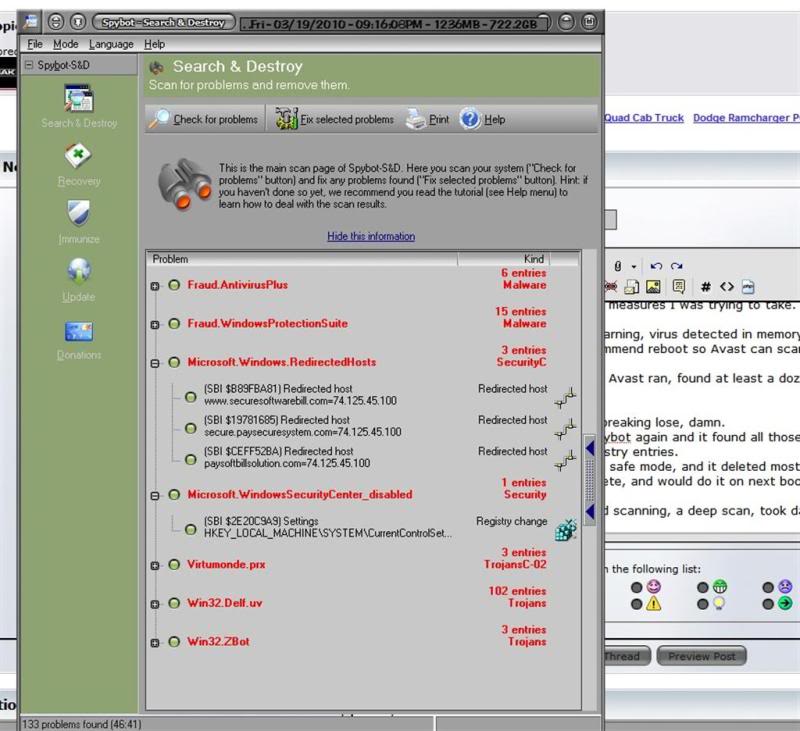
Edit - Did it again, all of those problems above, spybot is unable to get rid of.
Oh, and tried system restore, virus has got that covered too.
Only 1 restore point, and thats today - Got this virus about 3am this morning.
A few months ago my hard drive died a natural death, so I got a new one of course ... I have been meaning to reinstall my favorite game, Dark Crusade, and finally got around to doing it, I was just jonsin to play.
Wouldn't install, there were errors on the disc, I got 3 CD/DVD players in my computer, tried all 3 and they all couldn't install it. Tried cleaning it, still no luck, I was fixated on playing this game so I decided to download it, and of course using my legit serial #, there would be no problems.
So I found it and downloaded it, pretty big file 3.5 gb, took a few hours, so I put the image in my ******* drive, and right off the bat Avast popped up a virus warning.
I thought it was a false alarm, I figured why would anyone hide a virus in a 3gb file ?
So like an idiot I disable the virus and tried it again, clicked on setup and all hell broke lose.
Pop up windows galore, warnings left and right from programs I never installed, this disabled that disabled. In a panic I reactivated the anti virus, but it was too late.
This program, called Windows XP virus removal tool, popped up and started running a scan, finding dozens of virus and malicious programs, flashing all kinds of warnings.
At first I thought cool, never knew I had this program, it looks official, right from Microsoft.
But it has a button that says "click here to get the full version so you can be fully protected", so I got suspicious and figured it was the virus trying to get me to do something.
Couldn't stop this program, ctrl/alt/delete had no affect, closed down my firewall ect, and who knows what else.
So I ran spybot, took quite a while to scan, but it found a load of problems, including malicious registry entries, malware, spyware, bots, you name it.
So I clicked "fix the problems", and spybot froze right up.
This damn virus disabled any preventive measures I was trying to take.
So I tried running Avast again, it said warning, virus detected in memory. It is dangerous to work in this state, recommend reboot so Avast can scan and remove files before they load".
Sounded good to me, so I rebooted and Avast ran, found at least a dozen infections, and cleared them out.
So I booted normally, and hell was still breaking lose, damn.
So I tried botting in safe mode, I ran spybot again and it found all those probelms again, including the bogus registry entries.
Apparently the virus couldn't affect it in safe mode, and it deleted most of them, it said there was 1 it couldn't delete, and would do it on next boot up.
So I restarted again, and spybot started scanning, a deep scan, took damn near 4 hours.
Found more problems, deleted them so I ran Avast again, and now Avast is corrupted, won't run.
Tried installing AVG, it said Avast needs to be uninstalled first.
Fine - But the virus has got that covered, it won't uninstall. Same with Kaspery or whatever its called, tried to install that, but it needs Avast unistalled, which ain't happening.
Tried rebooting in safe mode again, and was greeted by a blank screen.
So now, I ran spybot again and it found 100's on infections, they seem to regenerate [screenshot below].
This virus seems to want to trick me into thinking everythings Ok, right now I can browse around almost normal, but I'm going to pull the internet connection as soon as I post this, who knows what its trying to do ?
So any advise to get rid of this thing ?
Edit - Did it again, all of those problems above, spybot is unable to get rid of.
Oh, and tried system restore, virus has got that covered too.
Only 1 restore point, and thats today - Got this virus about 3am this morning.
Last edited by xray99; Mar 19, 2010 at 09:28 PM.
Thread Starter
|
Banned
Joined: Apr 2009
Posts: 967
Likes: 0
From: MI USA
Tried booting in safe mode again, this time I could see the screen.
Ran spybot again, it found all listed above again, and was able to delete all but 1.
I tried to manually delete it, system wouldn't let me.
So it seems like this 1 file regenerates all this crap when I reboot, to verify I'm going to run spybot again, and see if all that crap is there again.
Any ideas feel free to chime in, I think I'm probably going to try a windows repair, and if that fails a reinstall of the OS.
Ran spybot again, it found all listed above again, and was able to delete all but 1.
I tried to manually delete it, system wouldn't let me.
So it seems like this 1 file regenerates all this crap when I reboot, to verify I'm going to run spybot again, and see if all that crap is there again.
Any ideas feel free to chime in, I think I'm probably going to try a windows repair, and if that fails a reinstall of the OS.

Grand Champion
Joined: Jan 2007
Posts: 5,584
Likes: 0
From: Lima, Ohio
You're screwed to put it lightly. I just went though basically the same thing. My advice is to get any important files off if it gives you a window to do so, then do a clean install of windows.
Thread Starter
|
Banned
Joined: Apr 2009
Posts: 967
Likes: 0
From: MI USA
I'm not giving up yet, I got it down to about 5 infections, alot better than the 125 or so I has earlier.
Hard to tell its even here now, but I know it is cause when I try to go to google, google refuses the connection, saying 'your computer may be sending automated queries".
Plus, ctrl/alt/delete will not bring up the running applications box anymore, I suppose if I could, I could kill the process, track it down and delete it.
I tried cyber defender, looked pretty promosing, found some infections but you gotta pay $30 for it to do anything about it.
It did tell me the location of some malicious registry entries, and I deleted them manually, so I am making some progress, as long as it doesn't regenerate like it did before.
I'm pretty sure I killed the regenerator, it would pop up a bunch of DOS type boxes when windows first started, I suppose to write new registry entries and spawn new infections, but it hasn't done that the last few boots.
I wonder how it killed my anti virus, its still there, just won't run or uninstall so I can install another anti virus program.
What I think I need is an app that will run at boot, and detect and kill the crap before it gets a chance to load.
If it wasn't for spybot, I'd be screwed. Nothing else works that I have tried so far.
Hard to tell its even here now, but I know it is cause when I try to go to google, google refuses the connection, saying 'your computer may be sending automated queries".
Plus, ctrl/alt/delete will not bring up the running applications box anymore, I suppose if I could, I could kill the process, track it down and delete it.
I tried cyber defender, looked pretty promosing, found some infections but you gotta pay $30 for it to do anything about it.
It did tell me the location of some malicious registry entries, and I deleted them manually, so I am making some progress, as long as it doesn't regenerate like it did before.
I'm pretty sure I killed the regenerator, it would pop up a bunch of DOS type boxes when windows first started, I suppose to write new registry entries and spawn new infections, but it hasn't done that the last few boots.
I wonder how it killed my anti virus, its still there, just won't run or uninstall so I can install another anti virus program.
What I think I need is an app that will run at boot, and detect and kill the crap before it gets a chance to load.
If it wasn't for spybot, I'd be screwed. Nothing else works that I have tried so far.
Last edited by xray99; Mar 20, 2010 at 01:40 AM.

I've had a few encounters with this as well. You can get rid of the mess like you are doing, but the problem you run into is a question you should be asking yourself... Is it worth my time and effort to do all this manually, or can I just wipe the drive clean and start new? I guarantee you that in the time you have spent and the time you WILL spend, you could have wiped and installed a new OS 4 or 5 times including the time you take to personalize it.
If you have access to your files that you need, move them to a flash drive or burn them to a disk. Just do something to have a copy in your hands and torch that drive.
Now, you can try a trial of Kaspersky, and it will run for 30 days before you have to pay for it. It will work clean and fully.
Just a friendly reminder- When downloading things like this from anywhere, never, ever, ever second guess your AV program.
Moved to PC help.
If you have access to your files that you need, move them to a flash drive or burn them to a disk. Just do something to have a copy in your hands and torch that drive.
Now, you can try a trial of Kaspersky, and it will run for 30 days before you have to pay for it. It will work clean and fully.
Just a friendly reminder- When downloading things like this from anywhere, never, ever, ever second guess your AV program.
Moved to PC help.

Site Moderator
Joined: Jan 2008
Posts: 8,374
Likes: 28
From: Sioux Falls, SD
You want to know what Geek Squad does to kill those fraud/scam type pieces of malware? Simultaneous sweeps with Kaspersky, Panda, Webroot (Sophos), and Spyware Doctor. Not cheap. That same program we use to run those also has the capability of running a McAfee sweep and a Trend Micro sweep, but both of those are suffering a bit right now, so we usually don't bother.
Personally, I also like to use SuperAntiSpyware (its free) on top of those, and Malwarebytes Anti-Malware (also free).
Personally, I also like to use SuperAntiSpyware (its free) on top of those, and Malwarebytes Anti-Malware (also free).
Thread Starter
|
Banned
Joined: Apr 2009
Posts: 967
Likes: 0
From: MI USA
Yeah I just tried superantispyware, seemed to clean up quite a bit, but needs a reboot to finish the process.
Adaware I installed, but it refuses to run, even in safe mode.
Kaspersky I tried to try, it won't install until I uninstall Avast, but the virus won't let me uninstall it.
I really haven't spent too much time messin with this, half of it is the challenge.
If you just give up and take the easy, obvious solutions to things, you don't learn.
Probably not too many folks who would know how to go picking through the registry and deleting entries, I have no problem doing it from previous experiences, and I will learn from this one.
If theres a posts in my name asking about gay sex or some ****, just realize that its the virus talking and not me !
That said, yeah I may have to reinstall.
These things are pretty insidious & deep rooted, sometimes thats the only option.
I knew I shouldn't have ignored the warnings, sometimes that little devil gets on your shoulder and you listen to bad advice.
I really wanted to play that game, still do. I'll probably just buy a used copy on ebay, which is where I got the last one.
edit - Just got a sealed copy for $8 shipped, I didn't have the nerve to sign into paypal in this condition, so I'll do it from the laptop later.
See, I got a little common sense.
Adaware I installed, but it refuses to run, even in safe mode.
Kaspersky I tried to try, it won't install until I uninstall Avast, but the virus won't let me uninstall it.
I really haven't spent too much time messin with this, half of it is the challenge.
If you just give up and take the easy, obvious solutions to things, you don't learn.
Probably not too many folks who would know how to go picking through the registry and deleting entries, I have no problem doing it from previous experiences, and I will learn from this one.
If theres a posts in my name asking about gay sex or some ****, just realize that its the virus talking and not me !
That said, yeah I may have to reinstall.
These things are pretty insidious & deep rooted, sometimes thats the only option.
I knew I shouldn't have ignored the warnings, sometimes that little devil gets on your shoulder and you listen to bad advice.
I really wanted to play that game, still do. I'll probably just buy a used copy on ebay, which is where I got the last one.
edit - Just got a sealed copy for $8 shipped, I didn't have the nerve to sign into paypal in this condition, so I'll do it from the laptop later.
See, I got a little common sense.
Last edited by xray99; Mar 20, 2010 at 02:58 AM.
Trending Topics
If you know how to do it manually, great. Been there done that. If I can entertain the option of wiping the OS and just throwing a new one on there, I'm going to. I don't like sitting in front of a computer for hours trying to get these messes that seem super glued to your HD off. Think of it from an IT hourly idea. If I have a customer come to me wanting that same system fixed cheap, I would probably charge less to install an OS than I would if I had to go in and nit pick the entire registry/files for issues. Time is money.
That said, do what you wanna do.
That said, do what you wanna do.
Guest
Posts: n/a
the reason its not letting you "uninstall" the old AV is because it uses the old AVs reg entries to "hide" in. Either way, your hosed. If you delete them, your system will still see the av as installed, but with corrupted registry entries. (already corrupt)
You wont be able to fully uninstall it. I would download the installer file to a USB drive and re-install it. Safe mode is your best bet here. Once installed, attempt to uninstall it again. Avast is pretty good. Kaspersky is probably better. since you have kaspersky I would try to use that one.
I have had to deal with this lovely virus on my grandfathers computer. Simultaneous sweeps with kaspersky, panda and Malware bytes did the trick for me.
I would also disconnect from the internet, since you are basically a spam bot right now...
You wont be able to fully uninstall it. I would download the installer file to a USB drive and re-install it. Safe mode is your best bet here. Once installed, attempt to uninstall it again. Avast is pretty good. Kaspersky is probably better. since you have kaspersky I would try to use that one.
I have had to deal with this lovely virus on my grandfathers computer. Simultaneous sweeps with kaspersky, panda and Malware bytes did the trick for me.
I would also disconnect from the internet, since you are basically a spam bot right now...
Thread Starter
|
Banned
Joined: Apr 2009
Posts: 967
Likes: 0
From: MI USA
I am a spambot, comcast just informed me that my ability to send email has been restricted due to the virus-like activity which it detected, which I'm glad of.
Can still receive at least.
I tried to use malware bytes, everyone seems to recommend it.
Unfortunately, the virus seems to be corrupting its installation, and I get errors trying to run it.
I got a program from avast itself that is supposed to remove it in safe mode, hopefully that will work and I'll be able to install another anti virus program that will put a hurting on this malicious crap.
As far as the OS reinstall, yeah if I did it as a paying business for someone else, I'd reinstall in a heartbeat.
But if I reinstall, I'd have to reinstall the dozens and dozens of apps & programs, video card/sound card/printer/scanner drivers, I'd have to backup some of my files, if I'm even able to do so ... Lotta hassle & time involved in all of that too, and something I'd rather avoid if possible, and I most certainly will do what I want to do.
My big mistake, besides ignoring the warnings of my anti virus, was not creating a mirror image of my drive, I have an extra hard drive hooked up for that very purpose, but never got around to doing it.
Can still receive at least.
I tried to use malware bytes, everyone seems to recommend it.
Unfortunately, the virus seems to be corrupting its installation, and I get errors trying to run it.
I got a program from avast itself that is supposed to remove it in safe mode, hopefully that will work and I'll be able to install another anti virus program that will put a hurting on this malicious crap.
As far as the OS reinstall, yeah if I did it as a paying business for someone else, I'd reinstall in a heartbeat.
But if I reinstall, I'd have to reinstall the dozens and dozens of apps & programs, video card/sound card/printer/scanner drivers, I'd have to backup some of my files, if I'm even able to do so ... Lotta hassle & time involved in all of that too, and something I'd rather avoid if possible, and I most certainly will do what I want to do.
My big mistake, besides ignoring the warnings of my anti virus, was not creating a mirror image of my drive, I have an extra hard drive hooked up for that very purpose, but never got around to doing it.

