


2006 RAM 2500 Radio Bezel removal


Professional
Joined: Jan 2006
Posts: 244
Likes: 0
From:
 RE: 2006 RAM 2500 Radio Bezel removal
pulled one about two months ago. i believe there are two screws at the very bottom. took me a while to get it out the frist time. like rauzersaid the wood grain and the grey piece are one piece. the top is held in by clips i think. you will have to forgive me it has been a while since ive had one apart.

Joined: Feb 2006
Posts: 34
Likes: 0
RE: 2006 RAM 2500 Radio Bezel removal
Took mine apart this morning. There are 2 screws at the bottom that must come out first. I have the fold out cupholders and the screws are in the open area, just under the center bezel, in the cupholder opening. Once those are out, some steady pressure gets the whole piece out, then just disconnect the plugs.
Professional
Joined: Jan 2006
Posts: 244
Likes: 0
From:
RE: 2006 RAM 2500 Radio Bezel removal
i thought i had remembered right. i had to pull one on one of the very first trucks we got in. didnt want to break that one. after about an hour and finally figuring out that is one whole piece, and running accross those screws, we got it out.

Joined: Mar 2006
Posts: 16
Likes: 0
From:
RE: 2006 RAM 2500 Radio Bezel removal
Ok for those of you that don't have a center console removing the bezel is two screws but if you have the center console like he pictured in his first post its a bit more to it.
You need to remove the top of the center console that has the cup holders in it it pulls up gently and is held with clips. Next you need to remove the bottom portion of the console. there are three bolts that hold that in once those bolts are removed you can pull up and remove. The console is in two parts so the arm rest back portion of the console stays in place. NEXT you need to remove two more bolts that you will find hidden on the bottom of each side. once these are out you can remove that covering that will allow you to reach the two screws that hold the bottom of the radio bezel.
Its that simple
You need to remove the top of the center console that has the cup holders in it it pulls up gently and is held with clips. Next you need to remove the bottom portion of the console. there are three bolts that hold that in once those bolts are removed you can pull up and remove. The console is in two parts so the arm rest back portion of the console stays in place. NEXT you need to remove two more bolts that you will find hidden on the bottom of each side. once these are out you can remove that covering that will allow you to reach the two screws that hold the bottom of the radio bezel.
Its that simple

Joined: Jul 2006
Posts: 1
Likes: 0
RE: 2006 RAM 2500 Radio Bezel removal
Anyone have any pictures? I have a standard transmisson, and while I can get the top part "poped" out and I see the screws from the inside, I cannot figure out how to remove the bottom to actually remove the screws...
Trending Topics

Joined: Jun 2007
Posts: 1
Likes: 0
RE: 2006 RAM 2500 Radio Bezel removal
Hello to ALL!!!!
In reply to the last poster. I have just managed to change my factory black dash to the factory woodgrain dash! I tell you all that it was a B**CH!!!
I have a 2007 RAM SXT, 6-speed; I had to start by removing thecup holder black pieces toreveal 3 screws\bolts (8mm), removethose in-order-to remove the cup holder assembly; next, remove 2 more screws\bolts (8mm) around the gear shift assembly- in-order-to remove it completely you will have to unclip the gear shift boot; next, locate 2screws (philip head) at the bottoma plastic piece, remove these screws and pulldown on the piece (it won't break); then, locate the 2 screws (phillip head) at the bottom of the dash(these are the ones holding the radio bezel); once these screws are are removed the bezel will come off. Pull the bezel hard from the driver's side (becareful not to pull too hard 'cause youwill have to follow it around the bezel tounclipit). Once the bezel is removed you will have to disconnect the power lines and you will be home free!!!!
In reply to the last poster. I have just managed to change my factory black dash to the factory woodgrain dash! I tell you all that it was a B**CH!!!
I have a 2007 RAM SXT, 6-speed; I had to start by removing thecup holder black pieces toreveal 3 screws\bolts (8mm), removethose in-order-to remove the cup holder assembly; next, remove 2 more screws\bolts (8mm) around the gear shift assembly- in-order-to remove it completely you will have to unclip the gear shift boot; next, locate 2screws (philip head) at the bottoma plastic piece, remove these screws and pulldown on the piece (it won't break); then, locate the 2 screws (phillip head) at the bottom of the dash(these are the ones holding the radio bezel); once these screws are are removed the bezel will come off. Pull the bezel hard from the driver's side (becareful not to pull too hard 'cause youwill have to follow it around the bezel tounclipit). Once the bezel is removed you will have to disconnect the power lines and you will be home free!!!!


Rookie
Joined: Oct 2008
Posts: 50
Likes: 0
From: Rapid City, SD
Hello to ALL!!!!
In reply to the last poster. I have just managed to change my factory black dash to the factory woodgrain dash! I tell you all that it was a B**CH!!!
I have a 2007 RAM SXT, 6-speed; I had to start by removing the cup holder black pieces to reveal 3 screws\bolts (8mm), remove those in-order-to remove the cup holder assembly; next, remove 2 more screws\bolts (8mm) around the gear shift assembly- in-order-to remove it completely you will have to unclip the gear shift boot; next, locate 2screws (phillip head) at the bottom a plastic piece, remove these screws and pull down on the piece (it won't break); then, locate the 2 screws (phillip head) at the bottom of the dash(these are the ones holding the radio bezel); once these screws are are removed the bezel will come off. Pull the bezel hard from the driver's side (be careful not to pull too hard 'cause you will have to follow it around the bezel to unclipit). Once the bezel is removed you will have to disconnect the power lines and you will be home free!!!!
In reply to the last poster. I have just managed to change my factory black dash to the factory woodgrain dash! I tell you all that it was a B**CH!!!
I have a 2007 RAM SXT, 6-speed; I had to start by removing the cup holder black pieces to reveal 3 screws\bolts (8mm), remove those in-order-to remove the cup holder assembly; next, remove 2 more screws\bolts (8mm) around the gear shift assembly- in-order-to remove it completely you will have to unclip the gear shift boot; next, locate 2screws (phillip head) at the bottom a plastic piece, remove these screws and pull down on the piece (it won't break); then, locate the 2 screws (phillip head) at the bottom of the dash(these are the ones holding the radio bezel); once these screws are are removed the bezel will come off. Pull the bezel hard from the driver's side (be careful not to pull too hard 'cause you will have to follow it around the bezel to unclipit). Once the bezel is removed you will have to disconnect the power lines and you will be home free!!!!
 Your dash looks a lot like mine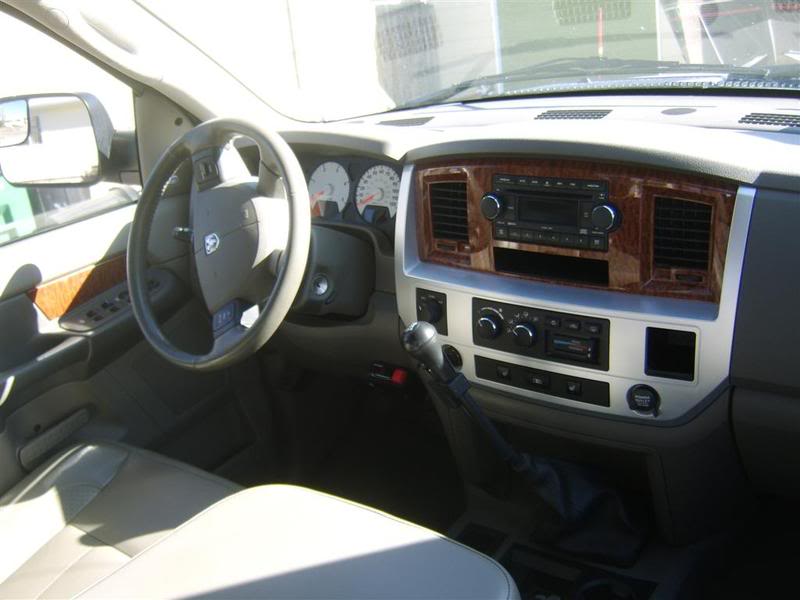
Last edited by nodakbassmaster; Nov 22, 2008 at 11:13 PM. Reason: pic added